

我们新增了三项测试版功能,让 Claude 能够动态发现、学习和执行工具。下面介绍它们的工作方式。
We’ve added three new beta features that let Claude discover, learn, and execute tools dynamically. Here’s how they work.
未来的 AI Agent 将能够在数百乃至数千个工具之间无缝协作。例如,一个集成了 git 操作、文件处理、包管理器、测试框架和部署流水线的 IDE 助手;或者,一个同时连接 Slack、GitHub、Google Drive、Jira、公司数据库以及数十个 MCP 服务器的运营协调助手。
The future of AI agents is one where models work seamlessly across hundreds or thousands of tools. An IDE assistant that integrates git operations, file manipulation, package managers, testing frameworks, and deployment pipelines. An operations coordinator that connects Slack, GitHub, Google Drive, Jira, company databases, and dozens of MCP servers simultaneously.
要构建高效的 Agent,就需要让它们能够使用规模不受限的工具库,而不必预先将每个工具定义都塞进上下文。我们关于结合 MCP 使用代码执行的博客讨论过:有时,Agent 还没读取用户请求,工具结果和工具定义就已消耗超过 50,000 个 token。Agent 应当按需发现和加载工具,只保留与当前任务相关的内容。
To build effective agents, they need to work with unlimited tool libraries without stuffing every definition into context upfront. Our blog article on using code execution with MCP discussed how tool results and definitions can sometimes consume 50,000+ tokens before an agent reads a request. Agents should discover and load tools on-demand, keeping only what's relevant for the current task.
Agent 还需要能够从代码中调用工具。使用自然语言进行工具调用时,每次调用都需要完整运行一轮模型推理,无论中间结果是否有用,它们都会不断堆积在上下文中。代码天然适合表达循环、条件判断和数据转换等编排逻辑。Agent 需要能够根据当前任务,灵活选择代码执行或模型推理。
Agents also need the ability to call tools from code. When using natural language tool calling, each invocation requires a full inference pass, and intermediate results pile up in context whether they're useful or not. Code is a natural fit for orchestration logic, such as loops, conditionals, and data transformations. Agents need the flexibility to choose between code execution and inference based on the task at hand.
Agent 还需要通过示例学习正确使用工具,而不只是依赖 schema 定义。JSON schema 定义了结构上什么是合法的,却无法表达使用模式:何时应该包含可选参数、哪些参数组合有意义,以及你的 API 期望遵循什么约定。
Agents also need to learn correct tool usage from examples, not just schema definitions. JSON schemas define what's structurally valid, but can't express usage patterns: when to include optional parameters, which combinations make sense, or what conventions your API expects.
今天,我们发布了三项使这些能力成为可能的功能:
Today, we're releasing three features that make this possible:
- 工具搜索工具(Tool Search Tool),让 Claude 能够借助搜索工具访问数千个工具,而不占满上下文窗口。
- 程序化工具调用(Programmatic Tool Calling),让 Claude 能够在代码执行环境中调用工具,减少对模型上下文窗口的影响。
- 工具使用示例(Tool Use Examples),提供一种通用标准,用来展示如何有效使用某个工具。
- Tool Search Tool, which allows Claude to use search tools to access thousands of tools without consuming its context window
- Programmatic Tool Calling, which allows Claude to invoke tools in a code execution environment reducing the impact on the model’s context window
- Tool Use Examples, which provides a universal standard for demonstrating how to effectively use a given tool
在内部测试中,我们发现这些功能帮助我们构建了一些传统工具使用模式无法实现的东西。例如,Claude for Excel 使用程序化工具调用来读取和修改包含数千行数据的电子表格,而不会让模型的上下文窗口过载。
In internal testing, we’ve found these features have helped us build things that wouldn’t have been possible with conventional tool use patterns. For example, Claude for Excel uses Programmatic Tool Calling to read and modify spreadsheets with thousands of rows without overloading the model’s context window.
根据我们的经验,我们相信,这些功能为你使用 Claude 构建产品开辟了新的可能性。
Based on our experience, we believe these features open up new possibilities for what you can build with Claude.
工具搜索工具
Tool Search Tool
面临的挑战
The challenge
MCP 工具定义提供了重要上下文,但连接的服务器越多,相关 token 开销就会不断累积。考虑一个接入五台服务器的配置:
MCP tool definitions provide important context, but as more servers connect, those tokens can add up. Consider a five-server setup:
- GitHub:35 个工具(约 26K token)
- Slack:11 个工具(约 21K token)
- Sentry:5 个工具(约 3K token)
- Grafana:5 个工具(约 3K token)
- Splunk:2 个工具(约 2K token)
- GitHub: 35 tools (~26K tokens)
- Slack: 11 tools (~21K tokens)
- Sentry: 5 tools (~3K tokens)
- Grafana: 5 tools (~3K tokens)
- Splunk: 2 tools (~2K tokens)
这意味着,对话还没有开始,58 个工具就消耗了约 55K token。再加上 Jira 等服务器(仅 Jira 就需要约 17K token),开销很快就会达到 100K token 以上。在 Anthropic,我们见过优化前的工具定义消耗 134K token 的情况。
That's 58 tools consuming approximately 55K tokens before the conversation even starts. Add more servers like Jira (which alone uses ~17K tokens) and you're quickly approaching 100K+ token overhead. At Anthropic, we've seen tool definitions consume 134K tokens before optimization.
但 token 成本并不是唯一问题。最常见的失败是选错工具和使用错误参数,尤其当工具名称相似时,例如 notification-send-user 和 notification-send-channel。
But token cost isn't the only issue. The most common failures are wrong tool selection and incorrect parameters, especially when tools have similar names like notification-send-user vs. notification-send-channel.
我们的解决方案
Our solution
工具搜索工具不再预先加载所有工具定义,而是按需发现工具。Claude 只会看到当前任务实际需要的工具。
Instead of loading all tool definitions upfront, the Tool Search Tool discovers tools on-demand. Claude only sees the tools it actually needs for the current task.
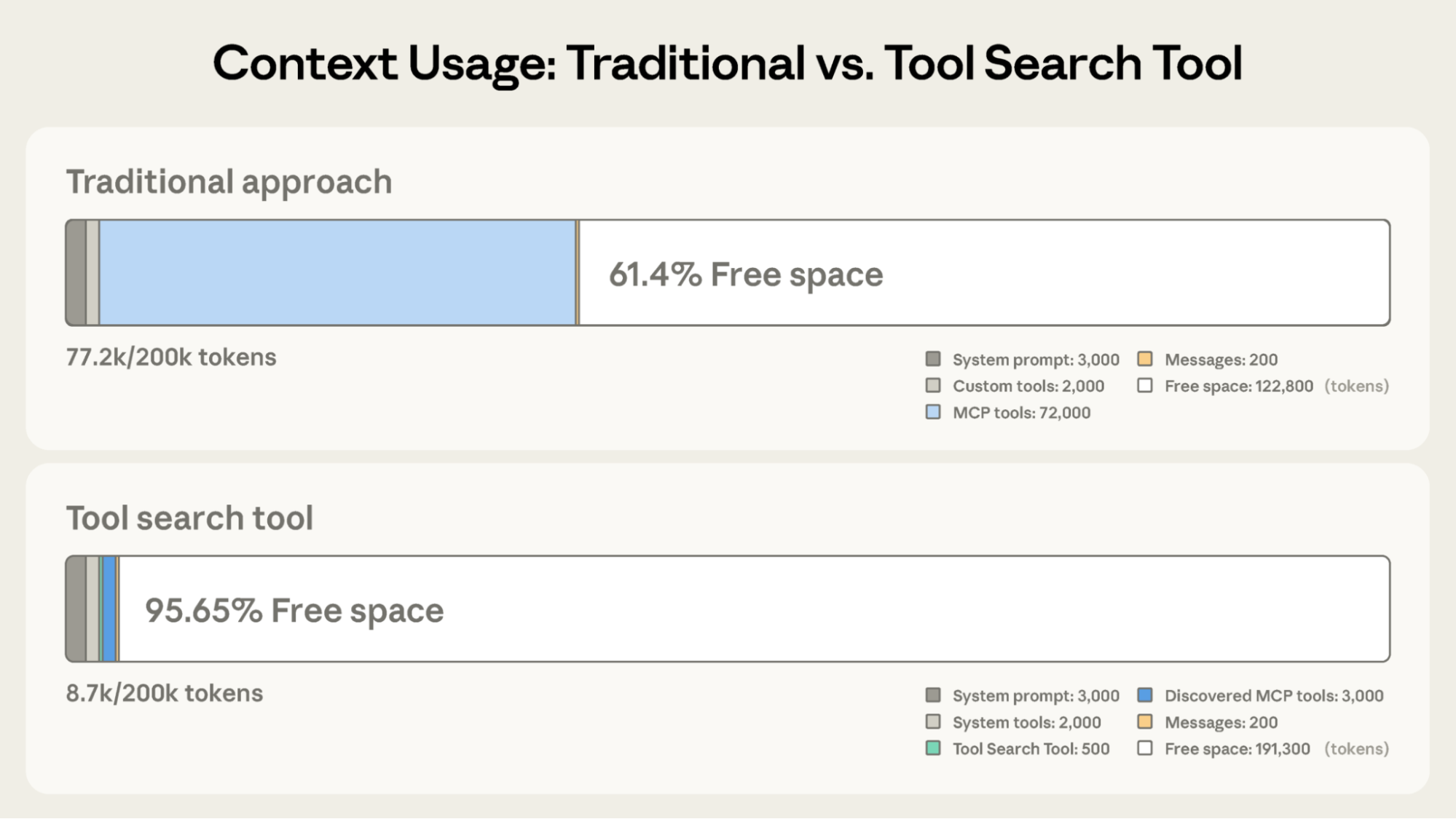
传统方式:
Traditional approach:
- 预先加载所有工具定义(50 多个 MCP 工具约需 72K token)。
- 对话历史和系统提示词争夺剩余空间。
- 上下文总消耗:尚未开始任何工作,就已用掉约 77K token。
- All tool definitions loaded upfront (~72K tokens for 50+ MCP tools)
- Conversation history and system prompt compete for remaining space
- Total context consumption: ~77K tokens before any work begins
使用工具搜索工具后:
With the Tool Search Tool:
- 预先只加载工具搜索工具本身(约 500 token)。
- 按需发现工具(3 至 5 个相关工具,约 3K token)。
- 上下文总消耗:约 8.7K token,保留了 95% 的上下文窗口。
- Only the Tool Search Tool loaded upfront (~500 tokens)
- Tools discovered on-demand as needed (3-5 relevant tools, ~3K tokens)
- Total context consumption: ~8.7K tokens, preserving 95% of context window
这样,在仍可访问完整工具库的同时,token 使用量减少了 85%。内部测试表明,在使用大型工具库时,MCP 评测的准确率显著提升。启用工具搜索工具后,Opus 4 从 49% 提高到 74%,Opus 4.5 从 79.5% 提高到 88.1%。
This represents an 85% reduction in token usage while maintaining access to your full tool library. Internal testing showed significant accuracy improvements on MCP evaluations when working with large tool libraries. Opus 4 improved from 49% to 74%, and Opus 4.5 improved from 79.5% to 88.1% with Tool Search Tool enabled.
工具搜索工具如何工作
How the Tool Search Tool works
工具搜索工具让 Claude 能够动态发现工具,而不是预先加载所有定义。你将全部工具定义提供给 API,但通过 defer_loading: true 标记工具,使其可以按需发现。延迟加载的工具一开始不会进入 Claude 的上下文。Claude 只能看到工具搜索工具本身,以及设置为 defer_loading: false 的工具,也就是最关键、最常用的那些工具。
The Tool Search Tool lets Claude dynamically discover tools instead of loading all definitions upfront. You provide all your tool definitions to the API, but mark tools with defer_loading: true to make them discoverable on-demand. Deferred tools aren't loaded into Claude's context initially. Claude only sees the Tool Search Tool itself plus any tools with defer_loading: false (your most critical, frequently-used tools).
当 Claude 需要某项具体能力时,它会搜索相关工具。工具搜索工具返回匹配工具的引用,这些引用随后在 Claude 的上下文中展开为完整定义。
When Claude needs specific capabilities, it searches for relevant tools. The Tool Search Tool returns references to matching tools, which get expanded into full definitions in Claude's context.
例如,如果 Claude 需要与 GitHub 交互,它会搜索“github”,随后只加载 github.createPullRequest 和 github.listIssues,而不会加载来自 Slack、Jira 和 Google Drive 的其他 50 多个工具。
For example, if Claude needs to interact with GitHub, it searches for "github," and only github.createPullRequest and github.listIssues get loaded—not your other 50+ tools from Slack, Jira, and Google Drive.
这样,Claude 既能访问你的完整工具库,又只需为实际需要的工具承担 token 成本。
This way, Claude has access to your full tool library while only paying the token cost for tools it actually needs.
关于提示缓存:工具搜索工具不会破坏提示缓存,因为延迟加载的工具完全不包含在初始提示中。只有 Claude 搜索后,它们才会加入上下文,因此你的系统提示词和核心工具定义仍然可以被缓存。
Prompt caching note: Tool Search Tool doesn't break prompt caching because deferred tools are excluded from the initial prompt entirely. They're only added to context after Claude searches for them, so your system prompt and core tool definitions remain cacheable.
实现方式:
Implementation:
对于 MCP 服务器,你可以对整台服务器启用延迟加载,同时保留特定的高频工具为预加载状态:
For MCP servers, you can defer loading entire servers while keeping specific high-use tools loaded:
Claude 开发者平台提供开箱即用的、基于正则表达式和 BM25 的搜索工具,你也可以使用嵌入向量或其他策略实现自定义搜索工具。
The Claude Developer Platform provides regex-based and BM25-based search tools out of the box, but you can also implement custom search tools using embeddings or other strategies.
何时使用工具搜索工具
When to use the Tool Search Tool
和任何架构决策一样,启用工具搜索工具也涉及取舍。它会在工具调用前增加一步搜索,因此,当节省的上下文与准确率提升足以抵消额外延迟时,收益最大。
Like any architectural decision, enabling the Tool Search Tool involves trade-offs. The feature adds a search step before tool invocation, so it delivers the best ROI when the context savings and accuracy improvements outweigh additional latency.
适合使用的情况:
Use it when:
- 工具定义消耗超过 10K token。
- 遇到工具选择准确率问题。
- 构建接入多台服务器、由 MCP 驱动的系统。
- 可用工具数量达到 10 个以上。
- Tool definitions consuming >10K tokens
- Experiencing tool selection accuracy issues
- Building MCP-powered systems with multiple servers
- 10+ tools available
收益较小的情况:
Less beneficial when:
- 工具库较小,工具少于 10 个。
- 每次会话中都会频繁使用全部工具。
- 工具定义本身很简短。
- Small tool library (<10 tools)
- All tools used frequently in every session
- Tool definitions are compact
程序化工具调用
Programmatic Tool Calling
面临的挑战
The challenge
随着工作流变得复杂,传统工具调用会带来两个根本问题:
Traditional tool calling creates two fundamental problems as workflows become more complex:
- 中间结果污染上下文:当 Claude 分析一个 10MB 日志文件以寻找错误模式时,整个文件都会进入上下文窗口,尽管 Claude 实际只需要错误频率的摘要。从多个表中获取客户数据时,每条记录都会在上下文中累积,不论是否相关。这些中间结果会消耗大量 token 预算,甚至可能把重要信息彻底挤出上下文窗口。
- 推理开销和人工式归纳:每次工具调用都需要完整运行一轮模型推理。收到结果后,Claude 必须“目测”数据以提取相关信息,推理各部分如何联系,再决定下一步做什么,这一切都通过自然语言处理完成。一个涉及五个工具的工作流,就意味着五轮模型推理,再加上 Claude 逐项解析结果、比较数值和归纳结论的过程。这既慢,也容易出错。
- Context pollution from intermediate results: When Claude analyzes a 10MB log file for error patterns, the entire file enters its context window, even though Claude only needs a summary of error frequencies. When fetching customer data across multiple tables, every record accumulates in context regardless of relevance. These intermediate results consume massive token budgets and can push important information out of the context window entirely.
- Inference overhead and manual synthesis: Each tool call requires a full model inference pass. After receiving results, Claude must "eyeball" the data to extract relevant information, reason about how pieces fit together, and decide what to do next—all through natural language processing. A five tool workflow means five inference passes plus Claude parsing each result, comparing values, and synthesizing conclusions. This is both slow and error-prone.
我们的解决方案
Our solution
程序化工具调用让 Claude 能够通过代码编排工具,而不是为每个工具单独进行一轮 API 往返。Claude 不必再逐个请求工具,并让每项结果都返回上下文;它可以编写代码,调用多个工具、处理输出,并控制哪些信息真正进入上下文窗口。
Programmatic Tool Calling enables Claude to orchestrate tools through code rather than through individual API round-trips. Instead of Claude requesting tools one at a time with each result being returned to its context, Claude writes code that calls multiple tools, processes their outputs, and controls what information actually enters its context window.
Claude 擅长编写代码。让它用 Python 表达编排逻辑,而不是通过自然语言逐项调用工具,就能获得更可靠、更精确的控制流。循环、条件判断、数据转换和错误处理,都会明确写在代码中,而不是隐含在 Claude 的推理里。
Claude excels at writing code and by letting it express orchestration logic in Python rather than through natural language tool invocations, you get more reliable, precise control flow. Loops, conditionals, data transformations, and error handling are all explicit in code rather than implicit in Claude's reasoning.
示例:预算合规检查
Example: Budget compliance check
考虑一个常见业务任务:“哪些团队成员超出了第三季度差旅预算?”
Consider a common business task: "Which team members exceeded their Q3 travel budget?"
你有三个可用工具:
You have three tools available:
get_team_members(department):返回团队成员列表,包含 ID 和职级。get_expenses(user_id, quarter):返回某位用户的费用明细。get_budget_by_level(level):返回某个员工职级的预算上限。
get_team_members(department)- Returns team member list with IDs and levelsget_expenses(user_id, quarter)- Returns expense line items for a userget_budget_by_level(level)- Returns budget limits for an employee level
传统方式:
Traditional approach:
- 获取团队成员,共 20 人。
- 逐人获取第三季度费用,共 20 次工具调用,每次返回 50 至 100 条明细,包括航班、酒店、餐饮和收据。
- 按员工职级获取预算上限。
- 所有这些内容都进入 Claude 上下文:2,000 多条费用明细,超过 50 KB。
- Claude 以人工式方式汇总每个人的费用、查找其预算,并将费用与预算上限比较。
- 需要更多次模型往返,并大量消耗上下文。
- Fetch team members → 20 people
- For each person, fetch their Q3 expenses → 20 tool calls, each returning 50-100 line items (flights, hotels, meals, receipts)
- Fetch budget limits by employee level
- All of this enters Claude's context: 2,000+ expense line items (50 KB+)
- Claude manually sums each person's expenses, looks up their budget, compares expenses against budget limits
- More round-trips to the model, significant context consumption
使用程序化工具调用后:
With Programmatic Tool Calling:
Claude 编写一个 Python 脚本,编排整个工作流,而不是让每个工具结果都返回模型。脚本在代码执行工具提供的沙箱环境中运行,需要你的工具结果时便暂停。当你通过 API 返回工具结果后,结果由脚本处理,而不是由模型读取。脚本继续执行,Claude 只会看到最终输出。
Instead of each tool result returning to Claude, Claude writes a Python script that orchestrates the entire workflow. The script runs in the Code Execution tool (a sandboxed environment), pausing when it needs results from your tools. When you return tool results via the API, they're processed by the script rather than consumed by the model. The script continues executing, and Claude only sees the final output.
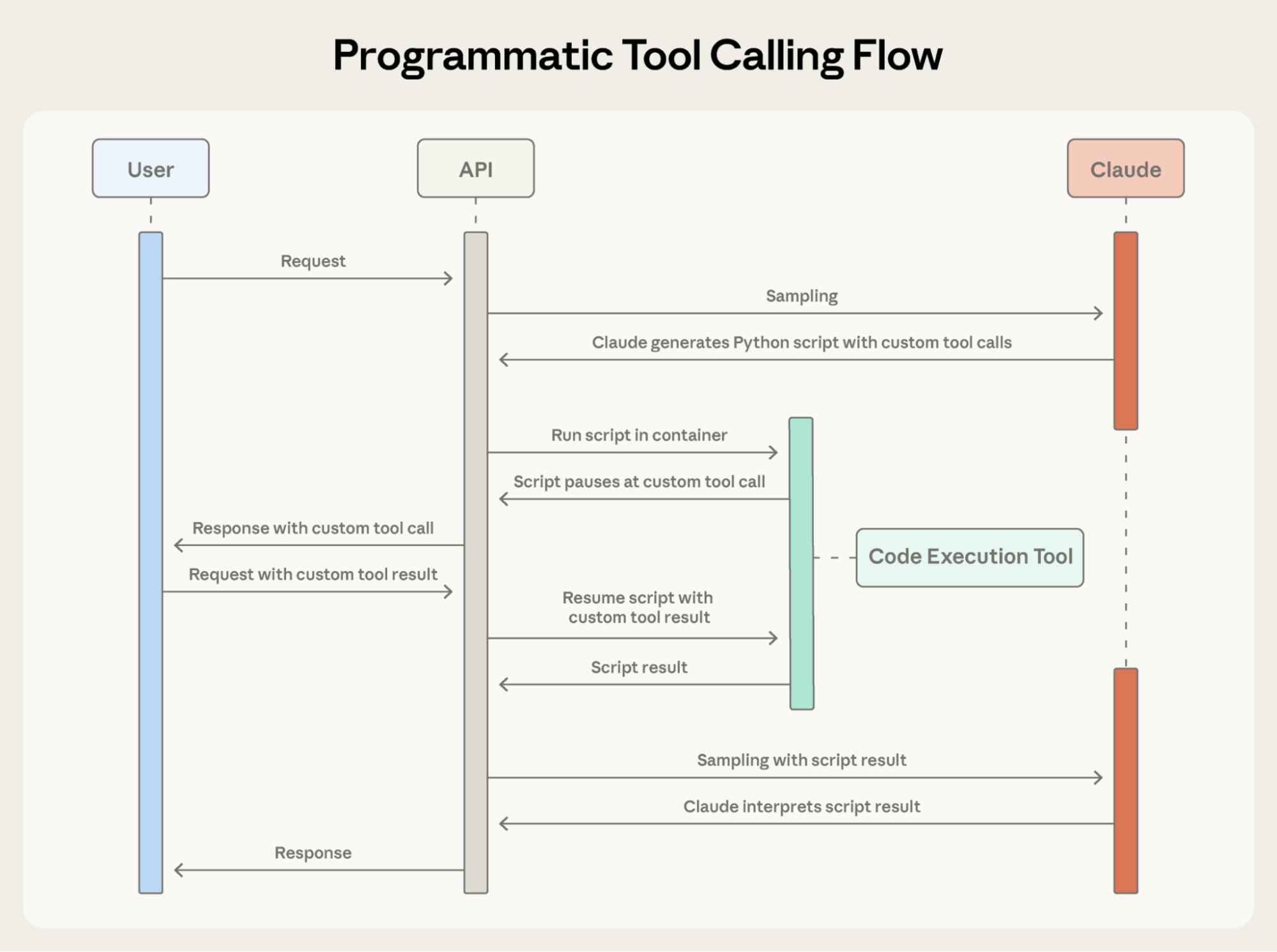
对于预算合规任务,Claude 编写的编排代码如下:
Here's what Claude's orchestration code looks like for the budget compliance task:
Claude 的上下文只接收最终结果:超出预算的那两三个人。2,000 多条明细、中间求和结果,以及预算查询结果,都不会影响 Claude 的上下文,输入从 200KB 原始费用数据缩减为仅 1KB 的结果。
Claude's context receives only the final result: the two to three people who exceeded their budget. The 2,000+ line items, the intermediate sums, and the budget lookups do not affect Claude’s context, reducing consumption from 200KB of raw expense data to just 1KB of results.
效率提升相当显著:
The efficiency gains are substantial:
- 节省 token:程序化工具调用(PTC)通过让中间结果留在 Claude 上下文之外,大幅减少 token 消耗。在复杂研究任务中,平均使用量从 43,588 token 降至 27,297 token,减少了 37%。
- 降低延迟:每次 API 往返都需要模型推理,耗时从数百毫秒到数秒不等。当 Claude 在同一个代码块中编排 20 多次工具调用时,就省去了 19 次以上的模型推理。API 负责处理工具执行,无需每次都返回模型。
- 提高准确率:通过编写明确的编排逻辑,Claude 比起用自然语言同时处理多个工具结果,出错更少。内部知识检索表现从 25.6% 提高到 28.5%;GIA 基准从 46.5% 提高到 51.2%。
- Token savings: By keeping intermediate results out of Claude's context, PTC dramatically reduces token consumption. Average usage dropped from 43,588 to 27,297 tokens, a 37% reduction on complex research tasks.
- Reduced latency: Each API round-trip requires model inference (hundreds of milliseconds to seconds). When Claude orchestrates 20+ tool calls in a single code block, you eliminate 19+ inference passes. The API handles tool execution without returning to the model each time.
- Improved accuracy: By writing explicit orchestration logic, Claude makes fewer errors than when juggling multiple tool results in natural language. Internal knowledge retrieval improved from 25.6% to 28.5%; GIA benchmarks from 46.5% to 51.2%.
生产工作流涉及杂乱数据、条件逻辑,以及需要扩展规模的操作。程序化工具调用让 Claude 能够通过程序处理这些复杂性,同时将注意力放在可据以行动的结果上,而不是原始数据处理上。
Production workflows involve messy data, conditional logic, and operations that need to scale. Programmatic Tool Calling lets Claude handle that complexity programmatically while keeping its focus on actionable results rather than raw data processing.
程序化工具调用如何工作
How Programmatic Tool Calling works
1. 将工具标记为可由代码调用
1. Mark tools as callable from code
将 code_execution 加入 tools,并设置 allowed_callers,为选定工具启用程序化执行:
Add code_execution to tools, and set allowed_callers to opt-in tools for programmatic execution:
API 会将这些工具定义转换成 Claude 可以调用的 Python 函数。
The API converts these tool definitions into Python functions that Claude can call.
2. Claude 编写编排代码
2. Claude writes orchestration code
Claude 不再逐个请求工具,而是生成 Python 代码:
Instead of requesting tools one at a time, Claude generates Python code:
3. 工具执行不经过 Claude 上下文
3. Tools execute without hitting Claude's context
当代码调用 get_expenses() 时,你会收到一个带有 caller 字段的工具请求:
When the code calls get_expenses(), you receive a tool request with a caller field:
你提供结果后,结果会在代码执行环境中处理,而不会进入 Claude 的上下文。代码中的每次工具调用,都会重复这个请求—响应循环。
You provide the result, which is processed in the Code Execution environment rather than Claude's context. This request-response cycle repeats for each tool call in the code.
4. 只有最终输出进入上下文
4. Only final output enters context
代码运行结束时,只将代码的结果返回给 Claude:
When the code finishes running, only the results of the code are returned to Claude:
Claude 看到的就只有这些,而不是过程中处理的 2,000 多条费用明细。
This is all Claude sees, not the 2000+ expense line items processed along the way.
何时使用程序化工具调用
When to use Programmatic Tool Calling
程序化工具调用会为工作流增加一个代码执行步骤。当 token 节省、延迟改善和准确率提升足够显著时,这份额外开销就是值得的。
Programmatic Tool Calling adds a code execution step to your workflow. This extra overhead pays off when the token savings, latency improvements, and accuracy gains are substantial.
收益最大的情况:
Most beneficial when:
- 处理大型数据集,但只需要聚合结果或摘要。
- 运行包含三个或更多相互依赖工具调用的多步骤工作流。
- 在 Claude 看到工具结果之前,对其进行过滤、排序或转换。
- 处理不应让中间数据影响 Claude 推理的任务。
- 针对大量对象并行操作,例如检查 50 个端点。
- Processing large datasets where you only need aggregates or summaries
- Running multi-step workflows with three or more dependent tool calls
- Filtering, sorting, or transforming tool results before Claude sees them
- Handling tasks where intermediate data shouldn't influence Claude's reasoning
- Running parallel operations across many items (checking 50 endpoints, for example)
收益较小的情况:
Less beneficial when:
- 进行简单的单工具调用。
- 任务要求 Claude 查看并推理所有中间结果。
- 进行返回内容较少的快速查询。
- Making simple single-tool invocations
- Working on tasks where Claude should see and reason about all intermediate results
- Running quick lookups with small responses
工具使用示例
Tool Use Examples
面临的挑战
The challenge
JSON Schema 擅长定义结构,包括类型、必填字段和允许的枚举值,但无法表达使用模式:何时包含可选参数、哪些组合有意义,以及你的 API 期望什么约定。
JSON Schema excels at defining structure–types, required fields, allowed enums–but it can't express usage patterns: when to include optional parameters, which combinations make sense, or what conventions your API expects.
考虑一个客服工单 API:
Consider a support ticket API:
schema 定义了哪些输入合法,却没有回答以下关键问题:
The schema defines what's valid, but leaves critical questions unanswered:
- 格式歧义:
due_date应该使用“2024-11-06”、“Nov 6, 2024”,还是“2024-11-06T00:00:00Z”? - ID 约定:
reporter.id是 UUID、“USR-12345”,还是仅仅“12345”? - 嵌套结构的用法:Claude 何时应该填写
reporter.contact? - 参数关联:
escalation.level和escalation.sla_hours与优先级之间有什么关系?
- Format ambiguity: Should
due_dateuse "2024-11-06", "Nov 6, 2024", or "2024-11-06T00:00:00Z"? - ID conventions: Is
reporter.ida UUID, "USR-12345", or just "12345"? - Nested structure usage: When should Claude populate
reporter.contact? - Parameter correlations: How do
escalation.levelandescalation.sla_hoursrelate to priority?
这些歧义可能导致格式错误的工具调用,以及不一致的参数使用方式。
These ambiguities can lead to malformed tool calls and inconsistent parameter usage.
我们的解决方案
Our solution
工具使用示例允许你直接在工具定义中提供调用样例。你无需仅依赖 schema,而是可以向 Claude 展示具体的使用模式:
Tool Use Examples let you provide sample tool calls directly in your tool definitions. Instead of relying on schema alone, you show Claude concrete usage patterns:
从这三个示例中,Claude 可以学到:
From these three examples, Claude learns:
- 格式约定:日期使用 YYYY-MM-DD,用户 ID 遵循 USR-XXXXX,标签使用 kebab-case,即以连字符连接单词。
- 嵌套结构模式:如何构造 reporter 对象,以及其中嵌套的 contact 对象。
- 可选参数关联:严重缺陷需要完整联系信息,以及带有严格 SLA 的升级处理设置;功能请求包含 reporter,但不包含 contact/escalation;内部任务则只需要标题。
- Format conventions: Dates use YYYY-MM-DD, user IDs follow USR-XXXXX, labels use kebab-case
- Nested structure patterns: How to construct the reporter object with its nested contact object
- Optional parameter correlations: Critical bugs have full contact info + escalation with tight SLAs; feature requests have reporter but no contact/escalation; internal tasks have title only
在我们自己的内部测试中,工具使用示例将复杂参数处理的准确率从 72% 提升到了 90%。
In our own internal testing, tool use examples improved accuracy from 72% to 90% on complex parameter handling.
何时使用工具使用示例
When to use Tool Use Examples
工具使用示例会增加工具定义中的 token,因此,当准确率提升超过额外成本时,它最有价值。
Tool Use Examples add tokens to your tool definitions, so they’re most valuable when accuracy improvements outweigh the additional cost.
收益最大的情况:
Most beneficial when:
- 复杂嵌套结构中,合法 JSON 并不意味着用法正确。
- 工具包含许多可选参数,而且何时包含哪些参数十分重要。
- API 存在 schema 未能表达的领域特定约定。
- 工具彼此相似,需要通过示例澄清该用哪一个,例如
create_ticket与create_incident。
- Complex nested structures where valid JSON doesn't imply correct usage
- Tools with many optional parameters and inclusion patterns matter
- APIs with domain-specific conventions not captured in schemas
- Similar tools where examples clarify which one to use (e.g.,
create_ticketvscreate_incident)
收益较小的情况:
Less beneficial when:
- 用法显而易见的简单单参数工具。
- URL 或电子邮件地址等 Claude 已经理解的标准格式。
- 适合通过 JSON Schema 约束来处理的验证问题。
- Simple single-parameter tools with obvious usage
- Standard formats like URLs or emails that Claude already understands
- Validation concerns better handled by JSON Schema constraints
最佳实践
Best practices
构建能够在现实世界中执行操作的 Agent,意味着必须同时处理规模、复杂性和精确性。这三项功能可以协同解决工具使用工作流中的不同瓶颈。下面介绍如何有效组合它们。
Building agents that take real-world actions means handling scale, complexity, and precision simultaneously. These three features work together to solve different bottlenecks in tool use workflows. Here's how to combine them effectively.
有策略地叠加功能
Layer features strategically
并非每个 Agent 在执行某项任务时,都需要使用全部三项功能。先从最大的瓶颈入手:
Not every agent needs to use all three features for a given task. Start with your biggest bottleneck:
- 工具定义导致上下文膨胀 → 工具搜索工具。
- 庞大中间结果污染上下文 → 程序化工具调用。
- 参数错误和格式不正确的调用 → 工具使用示例。
- Context bloat from tool definitions → Tool Search Tool
- Large intermediate results polluting context → Programmatic Tool Calling
- Parameter errors and malformed calls → Tool Use Examples
这种聚焦的方法,让你能够直接解决限制 Agent 表现的具体约束,而不是一开始就增加复杂度。
This focused approach lets you address the specific constraint limiting your agent's performance, rather than adding complexity upfront.
然后再按需叠加其他功能。它们彼此互补:工具搜索工具确保找到正确工具,程序化工具调用确保高效执行,工具使用示例确保正确调用。
Then layer additional features as needed. They're complementary: Tool Search Tool ensures the right tools are found, Programmatic Tool Calling ensures efficient execution, and Tool Use Examples ensure correct invocation.
配置工具搜索工具,改善工具发现
Set up Tool Search Tool for better discovery
工具搜索会匹配名称和描述,因此清晰、具有描述性的定义可以提高发现准确率。
Tool search matches against names and descriptions, so clear, descriptive definitions improve discovery accuracy.
在系统提示词中加入指导,让 Claude 知道有哪些能力可用:
Add system prompt guidance so Claude knows what's available:
让最常用的三至五个工具始终保持加载,其他工具延迟加载。这样,可以在常见操作的即时可用性与其余工具的按需发现之间取得平衡。
Keep your three to five most-used tools always loaded, defer the rest. This balances immediate access for common operations with on-demand discovery for everything else.
配置程序化工具调用,确保正确执行
Set up Programmatic Tool Calling for correct execution
由于 Claude 会编写代码来解析工具输出,应清楚记录返回格式。这有助于 Claude 写出正确的解析逻辑:
Since Claude writes code to parse tool outputs, document return formats clearly. This helps Claude write correct parsing logic:
以下是适合选择启用程序化编排、能够从中受益的工具:
See below for opt-in tools that benefit from programmatic orchestration:
- 可以并行运行的工具,即彼此独立的操作。
- 可以安全重试的操作,即幂等操作。
- Tools that can run in parallel (independent operations)
- Operations safe to retry (idempotent)
配置工具使用示例,提高参数准确率
Set up Tool Use Examples for parameter accuracy
设计示例时,应让使用行为清晰明确:
Craft examples for behavioral clarity:
- 使用贴近实际的数据,例如真实城市名称、合理价格,而不是“string”或“value”。
- 通过最少参数、部分参数和完整参数的不同写法展示多样性。
- 保持简洁:每个工具提供 1 至 5 个示例。
- 聚焦歧义:只有在无法从 schema 中明显看出正确用法时,才添加示例。
- Use realistic data (real city names, plausible prices, not "string" or "value")
- Show variety with minimal, partial, and full specification patterns
- Keep it concise: 1-5 examples per tool
- Focus on ambiguity (only add examples where correct usage isn't obvious from schema)
开始使用
Getting started
这些功能目前以测试版提供。要启用它们,请添加 beta 请求头,并包含所需工具:
These features are available in beta. To enable them, add the beta header and include the tools you need:
详细 API 文档和 SDK 示例,请参阅:
For detailed API documentation and SDK examples, see our:
- Documentation and cookbook for Tool Search Tool
- Documentation and cookbook for Programmatic Tool Calling
- Documentation for Tool Use Examples
这些功能推动工具使用从简单的函数调用走向智能编排。当 Agent 开始应对横跨数十种工具和大型数据集的更复杂工作流时,动态发现、高效执行和可靠调用,就成为基础能力。
These features move tool use from simple function calling toward intelligent orchestration. As agents tackle more complex workflows spanning dozens of tools and large datasets, dynamic discovery, efficient execution, and reliable invocation become foundational.
我们期待看到你用它们构建什么。
We're excited to see what you build.
致谢
Acknowledgements
本文由 Bin Wu 撰写,Adam Jones、Artur Renault、Henry Tay、Jake Noble、Noah Picard、Sam Jiang 和 Claude 开发者平台团队作出贡献。这项工作建立在 Chris Gorgolewski、Daniel Jiang、Jeremy Fox 和 Mike Lambert 的基础研究之上。我们也从整个 AI 生态中汲取了灵感,包括 Joel Pobar 的 LLMVM、Cloudflare 的 Code Mode,以及以代码执行方式使用 MCP。特别感谢 Andy Schumeister、Hamish Kerr、Keir Bradwell、Matt Bleifer 和 Molly Vorwerck 的支持。
Written by Bin Wu, with contributions from Adam Jones, Artur Renault, Henry Tay, Jake Noble, Noah Picard, Sam Jiang, and the Claude Developer Platform team. This work builds on foundational research by Chris Gorgolewski, Daniel Jiang, Jeremy Fox and Mike Lambert. We also drew inspiration from across the AI ecosystem, including Joel Pobar's LLMVM, Cloudflare's Code Mode and Code Execution as MCP. Special thanks to Andy Schumeister, Hamish Kerr, Keir Bradwell, Matt Bleifer and Molly Vorwerck for their support.
— 全文完 —
原文来自 Anthropic,中文为非官方学习译文。
查看原始出处 ↗