
过去一年,我们见识了编程 Agent 以各种能想到的方式失败:无视指令、未经要求执行危险命令,以及在最简单的任务上原地打转。
We've spent the past year watching coding agents fail in every conceivable way: ignoring instructions, executing dangerous commands un-prompted, and going in circles on the simplest of tasks.
我们见过一些团队交付大量粗制滥造的代码。甚至我们自己也交付过一点这样的东西。
We've seen teams ship immense amounts of slop. We've even shipped a little bit of slop ourselves.
每次,人们的第一反应都一样:
Every time, the instinct was the same:
- “我们只是需要更好的模型,GPT-6 会解决的。”
- “我们只是需要更强的指令遵循能力。”
- “只要训练数据里有了[我正在用的那个小众库],就能用了。”
- "We just need better models, GPT-6 will fix it"
- "We just need better instruction-following"
- "It'll work once [niche library I'm using] is in the training data"
但在经历几十个项目、数百次 Agent 会话后,我们不断得出同一个结论:这不是模型问题,而是配置问题。
But over the course of dozens of projects and hundreds of agent sessions, we kept arriving at the same conclusion: it's not a model problem. It's a configuration problem.
是的,模型会变聪明,一些现有失败模式也会消失。然后,正因为它们更聪明了,我们会交给它们更大、更难的新问题,而它们仍会继续以意想不到的方式失败。非预期的失败模式,是非确定性系统的根本问题。
Yes, models will get smarter, and some existing failure modes will disappear. And then because they are smarter, we will give them new problems which are bigger and harder, and they will continue to fail in unexpected ways. Unexpected failures modes are a fundamental problem for non-deterministic systems.
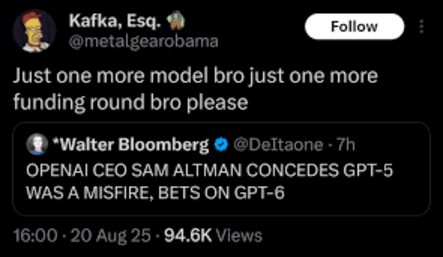
因此,与其祈祷 gpt-6.4-codex-ultrahigh_extended 来拯救我们,我们更努力聚焦于回答一个问题:“如何充分发挥今天的模型能力?”
So instead of praying for gpt-6.4-codex-ultrahigh_extended to save us all, we try to focus on answering the question of "how do we get the most out of today's models?"
提高编程 Agent 表现的方法很多。如果你用编程 Agent 处理过有一定难度的任务,大概已经对它做过一些配置。你用过技能吗?MCP 服务器呢?子 Agent、记忆、AGENTS.md 文件呢?
There are lots of ways to get better performance out of your coding agent. If you use coding agents for moderately hard tasks, you've probably configured your coding agent a bit. Have you used skills? MCP servers? Sub-agents? Memory? AGENTS.md files?
严格来说,这些是不同概念,但它们都属于编程 Agent 可配置的部分。我们称之为编程 Agent 的运行框架,并将其理解为 Agent 的运行时,或它的外围设备:模型借助什么与环境交互?
These are all technically separate concepts, but they are all part of the coding agent's configuration surface. We call this the coding agent's harness, and we think of it as the agent’s runtime, or as its peripherals: what does the model use to interact with its environment?
运行框架工程
Harness Engineering
运行框架工程这个术语由 Viv 提出,指的是利用这些配置点,定制并改善编程 Agent 输出质量和可靠性的实践。
Harness engineering, coined by Viv, describes the practice of leveraging these configuration points to customize and improve your coding agent's output quality and reliability.
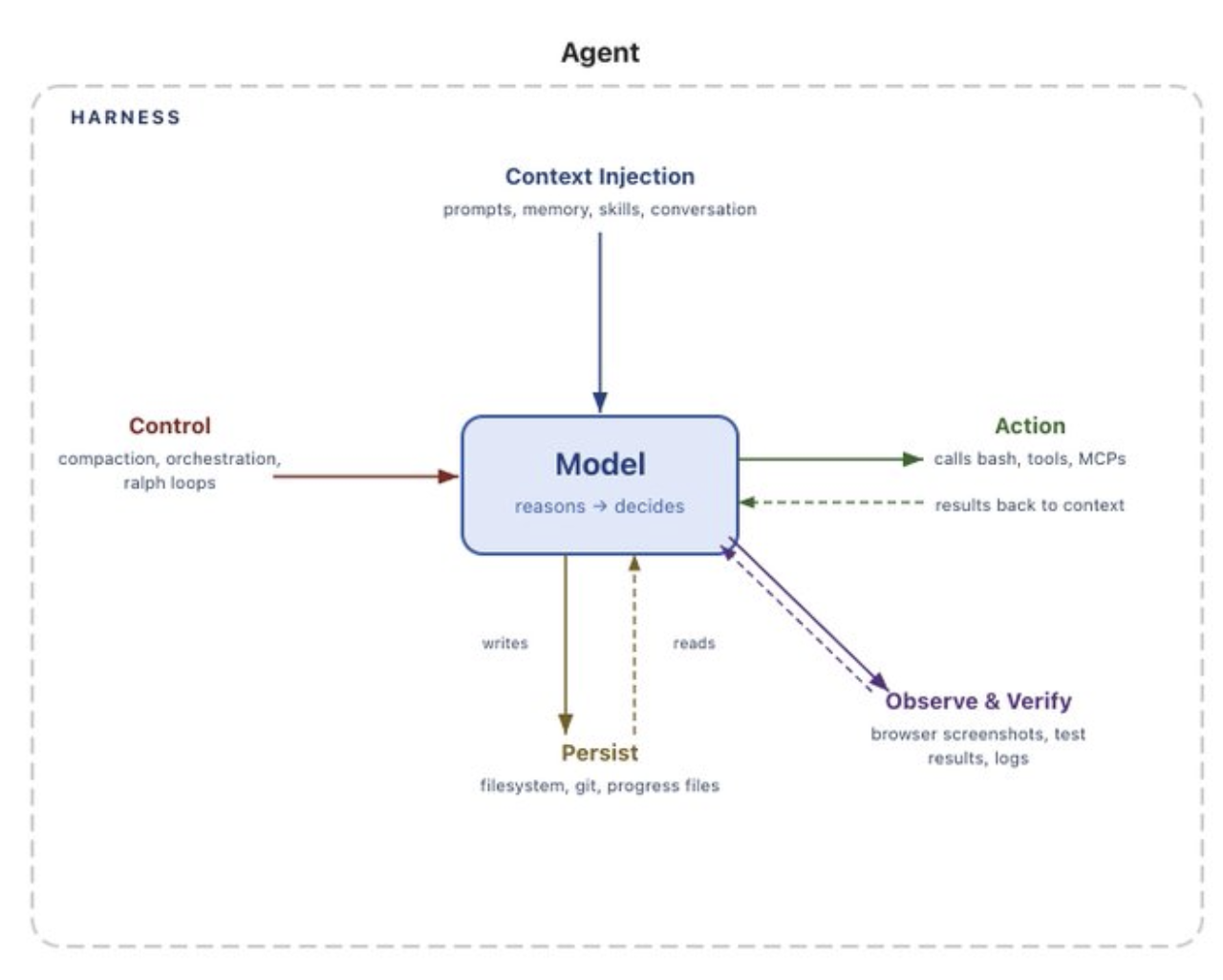 Image from Viv's post
正如 Mitchell Hashimoto 所说,运行框架工程:
As Mitchell Hashimoto put it, harness engineering
[……]其理念是,每当你发现 Agent 犯了一个错误,就花时间设计一个工程解决方案,让它不再犯同样的错误。
[...] is the idea that anytime you find an agent makes a mistake, you take the time to engineer a solution such that the agent never makes that mistake again.
……是上下文工程的一个子集
... as a Subset of Context Engineering
我们将运行框架工程视为上下文工程的一个子集。我的联合创始人 Dex 在 12-factor agents 中提出了上下文工程这一概念;它涵盖“提示工程”,以及系统性提高 AI Agent 可靠性的各种其他技术。原始演讲可以在这里观看。
We view harness engineering as a subset of context engineering. Coined by my cofounder Dex in 12-factor agents, context engineering is a superset of “prompt engineering” and a variety of other techniques for systematically improving AI agents’ reliability. You can find the original talk on here.
那么,运行框架工程就是上下文工程的一个子集,主要通过运行框架的配置点,精细管理编程 Agent 的上下文窗口。
Harness engineering then is the subset of context engineering which primarily involves leveraging harness configuration points to carefully manage the context windows of coding agents.
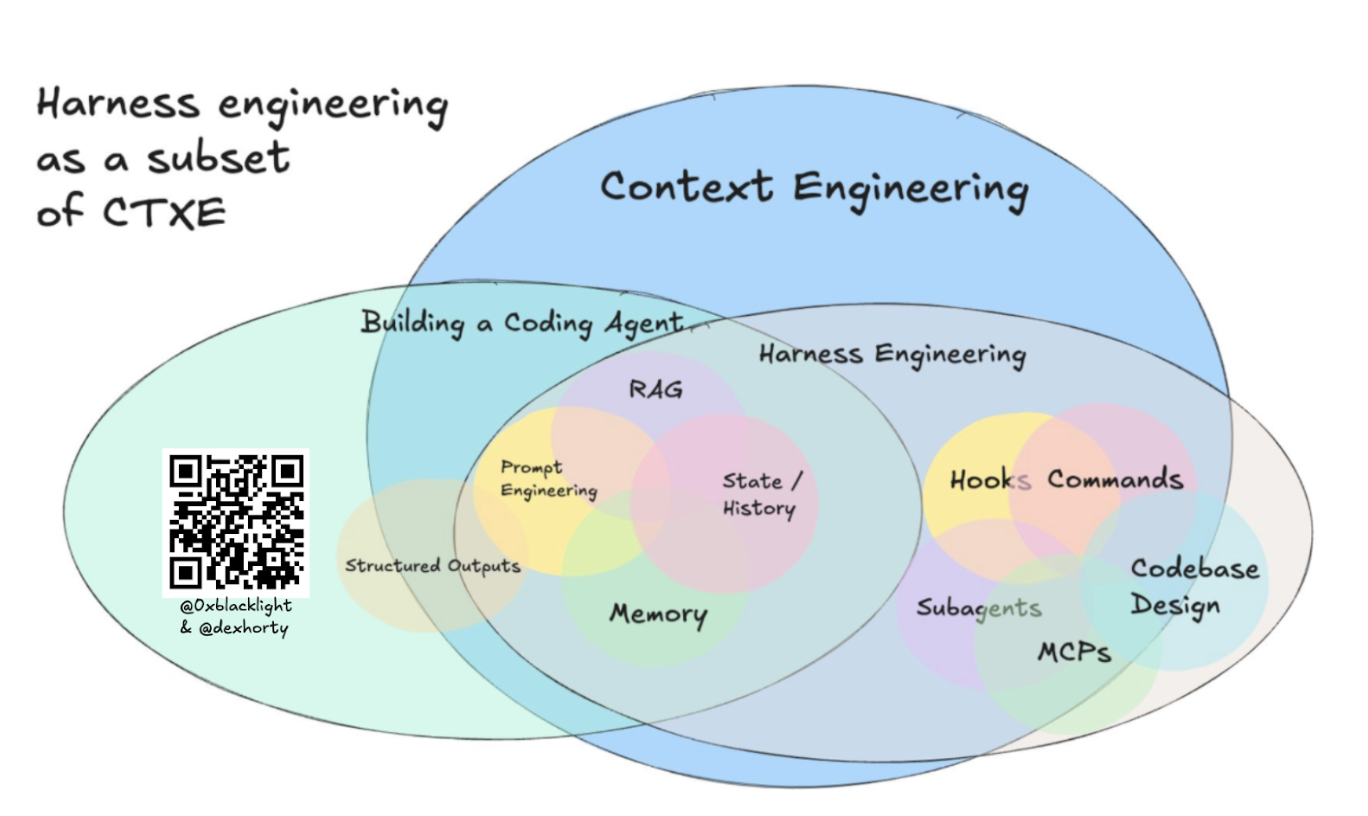
它回答以下问题:
It answers:
- 如何为编程 Agent 增加新能力?
- 如何教会它训练数据中没有的、关于我们代码库的知识?
- 除了在系统消息中写
CRITICAL: always do XYZ,如何引入更多确定性? - 如何让 Agent 的行为适应我们的特定代码库?
- 除了“神奇提示词”,如何提高任务成功率?
- 如何避免上下文窗口膨胀得过快,或充满太多低质量上下文?
- How do we give our coding agent new capabilities?
- How do we teach it things about our codebase that aren’t in the training data?
- How do we add determinism beyond
CRITICAL: always do XYZin the system message? - How do we adapt the agent’s behavior for our specific codebase?
- How do we increase task success rates beyond “magic prompts”?
- How do we prevent our context window from inflating too rapidly, or with too much bad context?
技能、MCP 服务器、子 Agent、钩子和反压机制,都是我们逐渐摸索出的具体解决手段。
Skills, MCP servers, sub-agents, hooks, and back-pressure mechanisms are all tactical solutions we’ve arrived at.
关于运行框架工程的不同观点
Views on Harness Engineering
Viv’s posts on harness engineering are worth reading alongside this one — the first frames the four customization levers (system prompt, tools/MCPs, context, sub-agents), and the second works backwards from what models can’t do natively to derive why each harness component exists.
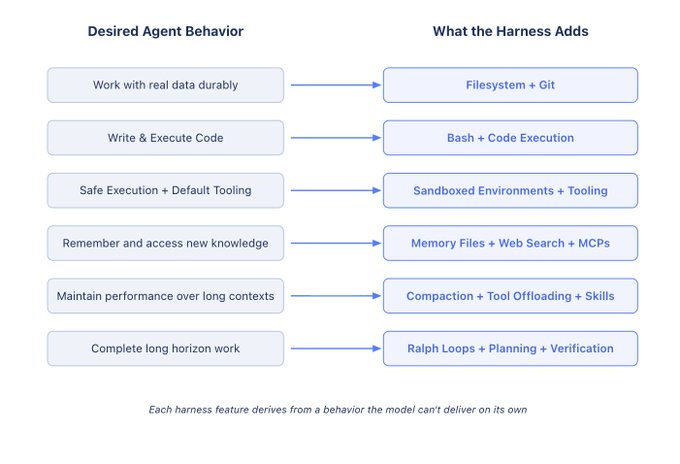 Image from Viv's post
我们还想补充两个他未着重强调的切入点:
We’d add two levers he doesn’t emphasize:
- 钩子:用于自动化集成和确定性控制流。
- 技能:用于渐进式披露知识。(Dex 喜欢称它们为“指令模块”,另一篇文章会进一步讨论。)
- hooks for automated integration and deterministic control flow
- skills for progressive disclosure of knowledge. (Dex likes to refer to them as "Instruction Modules" - more on this in another post.)
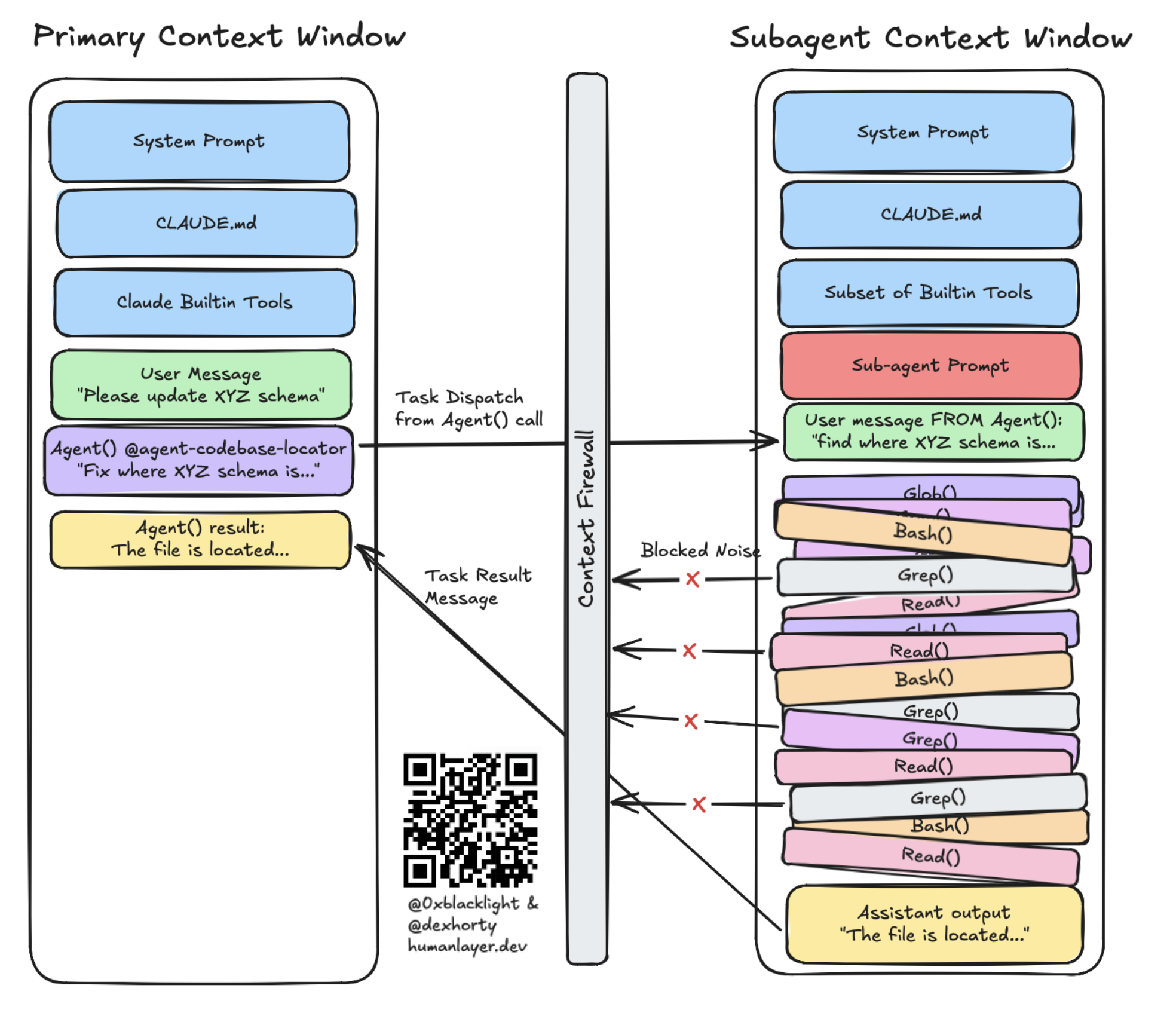
在复杂的既有企业级代码库中解决困难问题数月之后,我们发现子 Agent 是一个尤其有力的手段。当问题很难、需要许多个上下文窗口才能解决时,子 Agent 是跨大量会话保持连贯性的关键。子 Agent 充当“上下文防火墙”,确保独立任务在隔离的上下文窗口中运行,让中间噪声不会堆积在负责编排的父会话里,从而将连贯性维持长得多的时间。
After months of solving hard problems in complex brownfield enterprise-scale codebases, we have found that sub-agents are a particularly powerful lever. When working on hard problems that require many, many context windows to solve, sub-agents are the key to maintaining coherency across many sessions. Sub-agents function as a "context firewall" that ensures discrete tasks can run in isolated context windows so none of the intermediate noise accumulates in your parent thread which is responsible for orchestration, and you can maintain coherency for much, much longer.
OpenAI 最近也发布了一篇相关博客。其中有一些很好的内容;从文章来看,他们似乎将运行框架工程理解为配置 Agent 运行时之外的一切,更关注反压和验证机制。(不过,这也可能是误读;文章有些含糊:“harness”一词在正文只出现了一次,而且指向的是评测,而不是运行框架工程本身。)
OpenAI recently wrote a blog post on the topic as well. There's some great content in there, and it seems to indicate that they view harness engineering as configuring everything outside of the agent's runtime. It's more focused on back-pressure and verification mechanisms. (Although this may be a mis-reading; the post is somewhat unclear: the word "harness" only appears once in the text of the post, and in reference to evals rather than harness engineering itself.)
那后训练呢?
But What About Post-Training?
鉴于前沿编程模型会在各自的运行框架上进行后训练,例如 Claude 在 Claude Code 中、GPT-5 Codex 在 Codex 中,有人会认为,最好的运行框架或配置,就是模型训练时使用的那一套。
Given that frontier coding models are post-trained on their harnesses (e.g. Claude in Claude Code, GPT-5 Codex in Codex), some will argue that the best harness and/or configuration is the one that the model was trained on.
例如,Codex 模型与 Codex 框架的 apply_patch 工具耦合得非常紧密,以至于作为 Claude Code 开源替代方案构建的 OpenCode,不得不专门为 GPT/Codex 模型增加一个 apply_patch 工具,模仿 Codex 的框架,以改善 Codex 模型在 OpenCode 中的表现;与此同时,Claude 和其他模型仍使用普通的 edit 和 write 工具。
For example, the Codex models are so tightly coupled with the Codex harness's apply_patch tool that OpenCode — built as an open-source alternative to Claude Code — had to add an apply_patch tool specifically for GPT/Codex models to mimic the Codex harness to improve the Codex models' performance in the OpenCode harness - while Claude and other models still use normal edit and write tools.
这可能意味着,模型与后训练时使用的框架搭配,表现会更好;有人或许进一步推断,因此根本不应该定制运行框架。
This can mean that a model will perform better when coupled with the harness it was post-trained on, and some might infer that this means you shouldn't customize the harness at all.
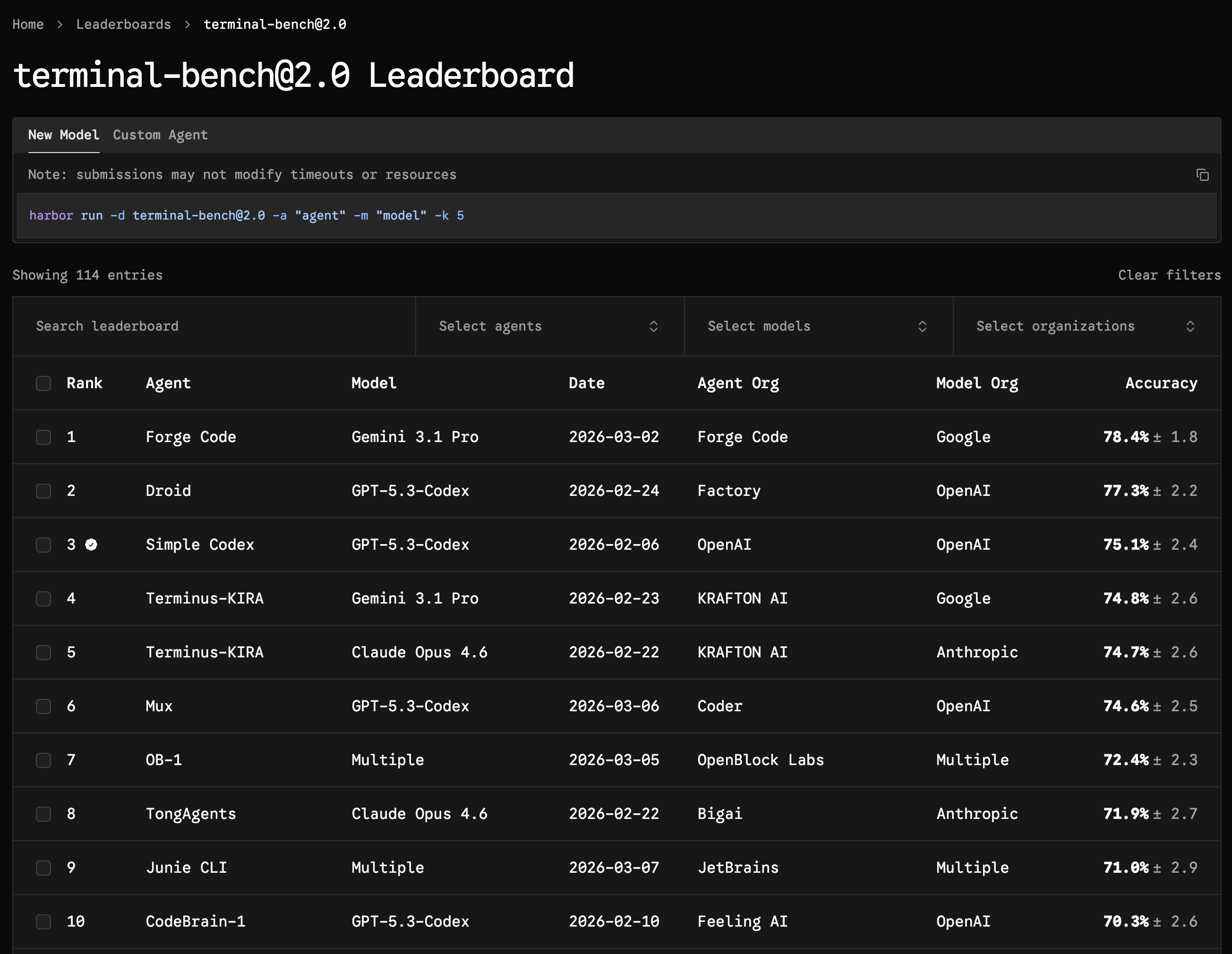
但事情也有另一面:模型可能对自己的运行框架过拟合。Viv 引用了 Terminal Bench 2.0:Claude Code 中的 Opus 4.6 排名第 33,而换到一个后训练时未见过的框架后,它能达到第 5 名,名次大约上下浮动 4 位。
But it cuts both ways: models can be over-fitted to their harness. Viv cites Terminal Bench 2.0 where Opus 4.6 in Claude Code comes in position #33, but when placed in a different harness that wasn't seen during post-training, it comes in at #5 (+/- about 4 positions in either direction).
打造你的运行框架
Engineering Your Harness
有了这些背景,下面来逐一看看我们认为影响最大的配置部分。
With that in mind, let's walk through the configuration surfaces we've found most impactful.
CLAUDE.md 与 AGENTS.md
CLAUDE.md & AGENTS.md
在调整其他运行框架配置点之前,通常值得先定制 CLAUDE.md / AGENTS.md 文件。它们是仓库顶层的 Markdown 文件,由运行框架确定性地注入 Agent 的系统提示词。
Before touching any other harness configuration points, it's usually worth customizing your CLAUDE.md / AGENTS.md files. These are markdown files at the top-level of your repository that get deterministically injected into the agent's system prompt by the harness.
我们已经分享过怎样写好 CLAUDE.md 以及如何正确使用它的一些看法;如果你不熟悉,可以先读那篇。Matt Pocock 也写了一篇很好的后续文章,更广泛地适用于 AGENTS.md。
We have already shared some opinions about what makes a good CLAUDE.md file and how to use it correctly, so give that a read if you're not familiar with it. Matt Pocock also wrote a great follow-up that more generally applies to AGENTS.md.
苏黎世联邦理工学院的研究
The ETH Zurich Study
苏黎世联邦理工学院发布了一项在不同仓库中测试 138 个 Agent 指令文件的研究,指出大部分指令文件无用,甚至有害。之后,我们的 CLAUDE.md 文章收到了不少这样的反馈:
After ETH Zurich published their study testing 138 agentfiles across various repos which indicated that most agentfiles were useless-or-worse, we got a lot of feedback on our CLAUDE.md post:
看吧,CLAUDE.md 文件根本没用,就是浪费时间。
See, CLAUDE.md files don't even help — they're a waste of time.
确实,这项研究在多种仓库中测试了许多 Agent 指令文件,并发现:
Indeed: the study tested many agentfiles across a wide variety of repos, and found:
- 大语言模型生成的文件实际上会降低表现,同时使成本增加 20% 以上。
- 人类编写的文件只带来了约 4% 的帮助。
- Agent 为处理上下文文件中的指令,多花了 14% 至 22% 的推理 token;完成任务所需步骤更多,运行工具也更多,但问题解决率并没有提高。
- 代码库概览和目录列表完全没有帮助;Agent 自己就能很好地发现仓库结构。
- that LLM-generated ones actually hurt performance while costing 20%+ more
- human-written ones only helped about 4%.
- Agents spent 14-22% more reasoning tokens processing context file instructions, took more steps to complete tasks, and ran more tools — all without improving resolution rates.
- Codebase overviews and directory listings didn't help at all; agents discover repository structure on their own just fine.
仔细阅读这项研究,会发现它表明我们原文的观点是正确的:
A careful reading of the study indicates that what we said in our post was correct:
Agent 自动生成的文件更差。没错,我们说过:
避免自动生成。想获得最好效果,应当认真编写内容。
许多文件过度引导模型使用特定工具,结果反而更差。没错,我们说过:
少即是多,这里指指令。虽然不应省略必要指令,但文件中的指令数量应在合理范围内尽量少。
文件包含无关上下文。没错,我们说过:
使用渐进式披露。
人工编写的文件帮助有限,是因为条件规则太多。没错,我们说过:
让 CLAUDE.md 的内容保持简洁,并且普遍适用。
Agent-generated files were worse. Yes, we said:
avoid auto-generating it. You should carefully craft its contents for best results.
Lots of files too-heavily-steered the model to use specific tools, causing worse outcomes. Yep, we said:
Less (instructions) is more. While you shouldn't omit necessary instructions, you should include as few instructions as reasonably possible in the file.
Files contained irrelevant context. Yep, we said:
Use Progressive Disclosure
The human-written ones barely helped because of too many conditional rules. Yep, we said:
Keep the contents of your CLAUDE.md concise and universally applicable.
我们的 CLAUDE.md 不到 60 行。
Our CLAUDE.md is under 60 lines.
MCP 服务器用于提供工具
MCP Servers Are for Tools
MCP 服务器主要用于将工具接入编程 Agent,让其能力超越文件输入输出和 bash 命令。MCP 规范还包括资源、提示词和信息征询等附加功能,但MCP 客户端和编程 Agent 运行框架通常并不能很好地支持这些功能。
MCP servers are primarily for plugging tools into your coding agent to extend its capabilities beyond file I/O and bash commands. The MCP specification includes additional features like resources, prompts, and elicitations, but these are generally not well-supported by MCP clients and coding agent harnesses.
MCP 规范支持在你或 Agent 的本地机器上运行服务器,让 Agent 与本地环境交互;它也支持基于 HTTP 的 MCP 服务器,将 Agent 连接到 Linear、Sentry 等远程工具与服务。
The MCP spec supports servers that run on your (or the agent's) local machine which allow the agent to interact with its local environment, but it also supports HTTP-based MCP servers that can connect your agent with remote tools and services like Linear, Sentry, and more.
将 MCP 服务器接入编程 Agent 时,可用工具列表、工具描述,以及调用所需参数,都会被注入编程 Agent 的系统提示词。因此,MCP 服务器可以在工具描述中告诉 Agent 何时使用工具,从而定制 Agent 的行为。
When you plug an MCP server into your coding agent, the list of available tools, their descriptions, and the arguments needed to invoke them are injected into your coding agent's system prompt. As a result, the MCP server can use the tool descriptions to customize your agent’s behavior by providing your agent with instructions about when to use them.
警告:由于 MCP 服务器的工具描述会被加入编程 Agent 的系统提示词,千万不要连接不信任的服务器。这可能成为危险的提示注入途径!STDIO 服务器,以及其他通过 npx 或 uvx 在客户端运行的服务器,即使没有提示注入,也能在宿主机上执行代码。
WARNING: because MCP servers’ tool descriptions are added to your coding agent’s system prompt, never connect to one you don’t trust. This can be a dangerous vector for prompt injection! STDIO servers and other servers that run client-side with npx or uvx can also execute code on your host in the absence of prompt injection.
工具太多并不是好事
Too Many Tools Is Bad
我们亲眼见过:给 Agent 接入太多 MCP 工具,上下文窗口就会被工具描述塞满,让你更快进入“变笨区”:
We’ve seen this firsthand: plug too many MCP tools into your agent, and the context window fills up with tool descriptions, pushing you into the dumb zone much faster:
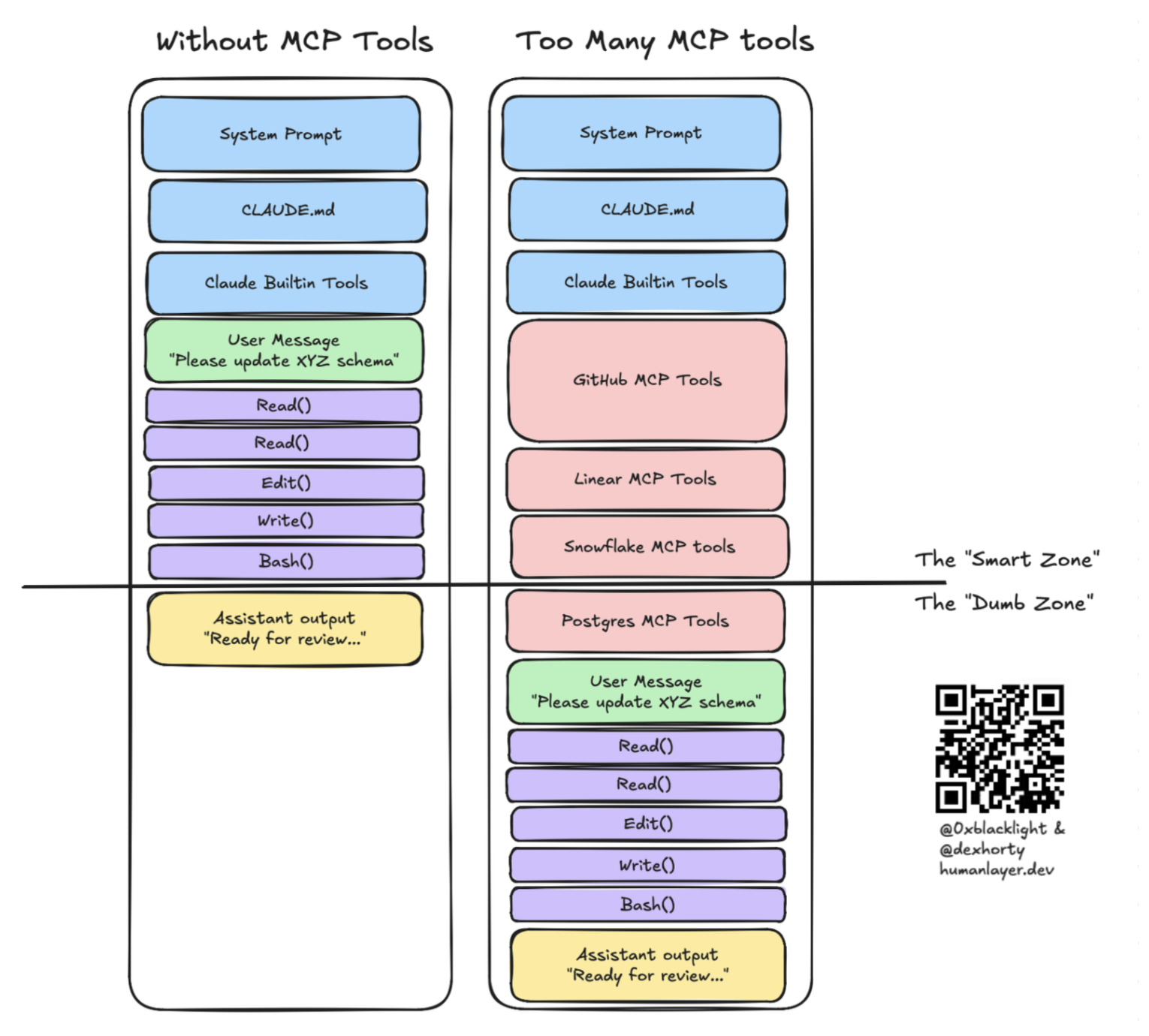
指令预算同样重要:每一条无关工具描述,都是 Agent 必须处理、却没有任何收益的指令。
The instruction budget matters too — every irrelevant tool description is an instruction the agent has to process without any benefit.
事实上,这些失败模式十分常见,以至于 Anthropic 发布了实验性的 MCP 工具搜索支持:当用户连接的 MCP 工具太多时,逐步向 Claude 披露工具。简而言之,如果一个服务器提供了大量工具,而你并没有实际使用它,就把它关掉。
In fact, these failure modes are so common that Anthropic released experimental support for MCP tool search to progressively disclose tools to Claude when the user has too many MCP tools connected. TL;DR: if you’re not actively using a server which provides a large number of tools, turn it off.
我们还发现,如果某个 MCP 服务器的功能,已经由训练数据中充分出现过的命令行工具提供,那么直接提示 Agent 使用 CLI 效果更好。对于 GitHub、Docker 或大多数数据库,编程 Agent 完全可以使用恰当的 CLI 和 Shell 命令。模型训练时见过这些工具足够多次,已经知道如何使用;而且你还能获得与 grep、jq 等工具组合的额外好处,进一步提高上下文效率。
We also found that if an MCP server duplicates functionality that’s already available as a CLI well-represented in training data, it works better to just prompt the agent to use the CLI. For things like GitHub, Docker, or most databases, your coding agent can just use the right CLIs and shell commands. The model has seen these tools enough during training that it already knows how to use them, and you gain the added benefit of composability with tools like grep and jq to enable additional context-efficiency.
始终做好上下文工程
Always Be Context-Engineering
在 HumanLayer,我们用了一段时间 Linear MCP 服务器,才意识到实际只使用它提供的一小部分工具。因此,我们写了一个小型 CLI 来封装 Linear API,提供非常节省上下文的响应,并在 CLAUDE.md 中加入了 6 个使用示例:
At HumanLayer, we used the Linear MCP server for a while before realizing that we really only used a small subset of the tools it provides - so we wrote a small CLI that wraps the Linear API and provides very context-efficient responses, and we included 6 example usages in our CLAUDE.md file:
这省去了原本由 MCP 服务器工具定义占据系统提示词的数千个 token;对于冗长的 MCP 服务器响应,节省的 token 还要更多。
This saved us thousands of tokens from the MCP server's tool definitions that were ending up in our agent’s system prompt, and many more from the verbose MCP server responses.
技能用于复用知识,也用于提供工具
Skills Are for Reusable Knowledge (and Tools)
技能最初由 Anthropic 为 Claude Code 引入,之后成为开放标准,也得到 Codex、OpenCode 等其他运行框架的支持。其结构可以阅读 Anthropic 文档;这里更重要的是它们为什么有用。
Skills were originally introduced by Anthropic for use with Claude Code, but have since become an open standard supported by other harnesses like Codex and OpenCode. You can read about how they're structured in the Anthropic docs — what matters here is why they're useful.
继续之前先提醒一句:已经有技能注册中心被发现传播数百个恶意技能。对待技能,应像对待 npm install random-package 一样,先阅读自己要安装的内容。ClawHub 和 skills.sh 这样的注册中心,可以在你的机器上执行任意代码。
Before we go further: skill registries have already been caught distributing hundreds of malicious skills. Treat skills like you'd treat npm install random-package — read what you're installing. Registries like ClawHub and skills.sh can execute arbitrary code on your machine.
渐进式披露
Progressive Disclosure
我们很早就吸取了这一教训:不断把每条指令、每个工具塞进系统提示词,Agent 却不断变差。它还没开始工作,我们就已经耗尽了指令预算。技能通过渐进式披露解决这一问题:只有当 Agent 判断需要,或你替它作出这个判断时,它才会接触到具体的指令、知识或工具。
We learned this one early: we kept stuffing every instruction and tool into the system prompt, and the agent kept getting worse. We were blowing through our instruction budget before the agent even started working. Skills solve this through progressive disclosure — the agent only gets access to specific instructions, knowledge, or tools when it decides (or you decide for it) that it needs them.
技能激活
Skill Activation
技能被激活后,技能目录中的 SKILL.md 文件会作为用户消息加载进 Agent 的上下文窗口,Agent 也会获知该技能文件来自哪个目录。SKILL.md 可以告诉 Agent 同目录还打包了哪些内容:
When a skill is activated, the SKILL.md file in the skill's directory is loaded into the agent's context window as a user message, and the agent is informed of the directory that the skill file was loaded from. The SKILL.md file may inform the agent of anything else it's bundled with:
每个技能都有自己的目录,因此你可以更灵活地运用渐进式披露:比如在技能中打包多个 Markdown 文件,分别包含不同功能或不同用途的信息;主 SKILL.md 文件则告诉 Agent 其他文件是什么,以及是否、何时应该读取它们。
Since each skill has its own directory, you can get even more creative with progressive disclosure: you might bundle several markdown files in the skill, each of which contains different information about different functionalities or for different purposes, and the main SKILL.md file can tell the agent what the other files in the skill are and if/when it should read them.
通过技能分发工具
Distributing Tools with Skills
遗憾的是,不能直接把 MCP 服务器或自定义 Agent 工具打包进技能。你必须将它们写成可执行程序、CLI、NPM 包或其他形式,与技能一起分发,或者在技能文件中指示 Agent 安装。
Unfortunately, it's not possible to bundle MCP servers or custom agent tools directly into a skill - you have to write them into an executable, a CLI, an NPM package, or something else which you can either distribute with your skill or instruct the agent to install in the skill file.
例如,与其配置 Playwright MCP 服务器,你也可以直接提供网页浏览技能,使用 BrowserBase 的 Agent 浏览器技能,或 Vercel 的 Agent 浏览器 CLI。
For example, instead of configuring a Playwright MCP server, you could just provide your agent with a skill for web browsing using BrowserBase's agent browser skills or Vercel's agent browser CLI.
子 Agent 用于控制上下文
Sub-Agents Are for Context Control
子 Agent 是一个流行、但经常被误解的运行框架配置点。我们试过“前端工程师”子 Agent、“后端工程师”子 Agent、“数据分析师”子 Agent 这一套,行不通。真正有效的,是用子 Agent 做上下文控制。
Sub-agents are a popular but often misunderstood harness configuration point. We tried the "frontend engineer" sub-agent and "backend engineer" sub-agent and "data analyst" sub-agent thing. It doesn't work. What does work is using sub-agents for context control.
子 Agent 可以封装相当于一个完整编程 Agent 会话的工作量,让派发任务的 Agent 只看到自己写给子 Agent 的提示,以及子 Agent 的最终结果。中间的工具调用、工具结果和其他消息,都不会进入父编程 Agent 的上下文窗口。
They provide a way to encapsulate an entire coding agent session's worth of work such that the dispatching agent only sees the prompt it writes for the sub-agent, and the sub-agent's final result. None of the intermediate tool calls, tool results, or other messages end up in the parent coding agent's context window.
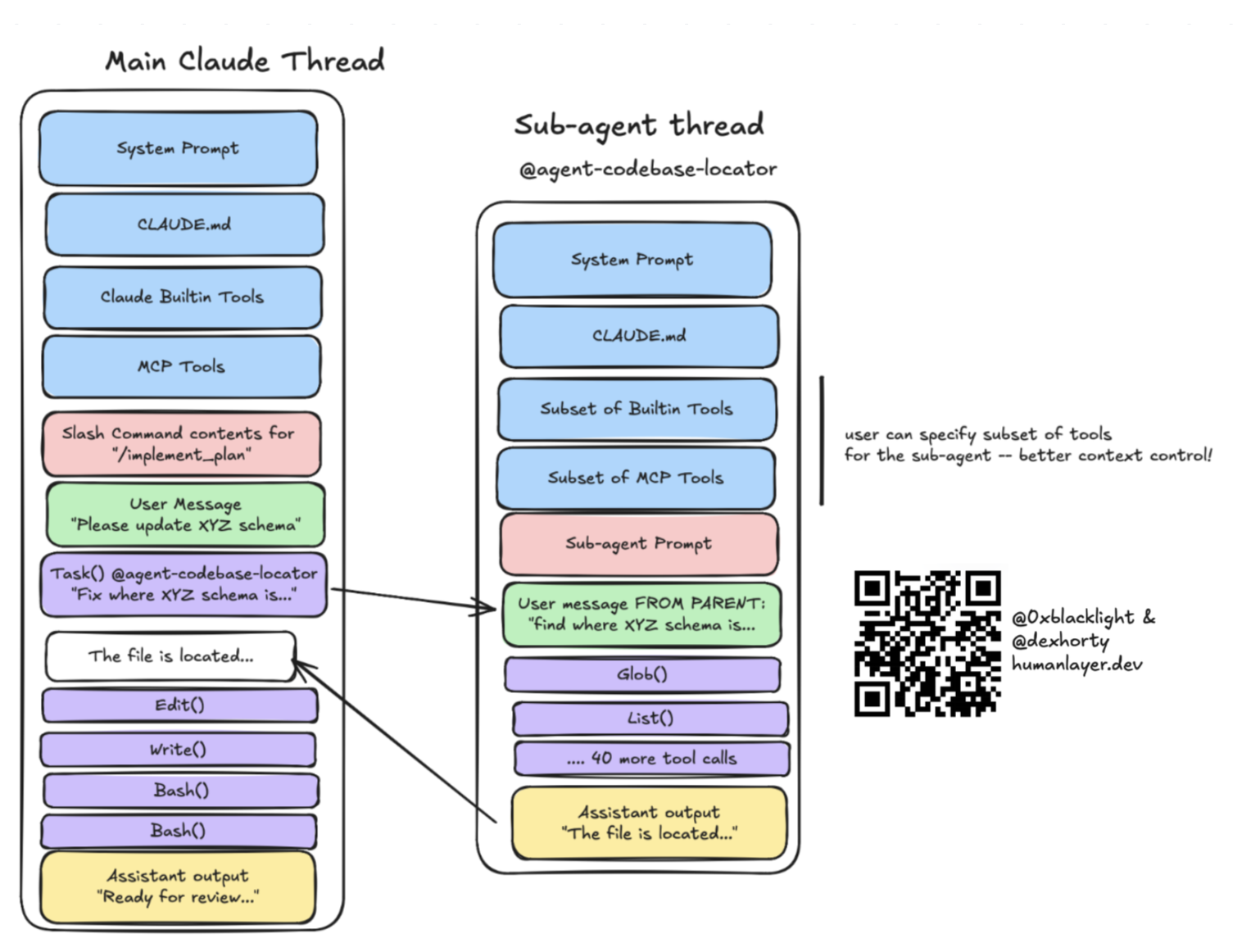
将工作拆成独立任务,并委派给子 Agent,是我们让主编程 Agent 会话保持在“聪明区”的方法。日常工作流中的研究、实现,以及其他许多上下文密集型任务,都是这样处理的。
Breaking work up into discrete tasks and delegating it to sub-agents is how we keep our primary coding agent thread in the "smart zone." This is how we handle research, implementation, and a number of other context-heavy tasks in our day-to-day workflows.
子 Agent 避免上下文腐化
Sub-Agents Avoid Context Rot
Chroma's context rot research provides empirical backing to what we've been saying for a long time: models perform worse at longer context lengths. Avoid the dumb zone.
Chroma 研究人员在“大海捞针”任务上测试了 18 个模型。诚然,这与 Agent 编程很不一样,但发现与我们的经验完全吻合:随着上下文变长,表现会下降,哪怕任务很简单。
Chroma researchers tested 18 models on needle-in-a-haystack tasks, which is admittedly quite different from agentic coding. But the finding matches our experience exactly: performance degrades as context length increases — even on simple tasks.
更糟的是,当问题与上下文中相关信息的语义相似度较低时,退化会更加剧烈。我们曾实时看到这种情况:父会话中每次最终无关的中间工具调用、每条 grep 结果、每次文件读取,都是潜在干扰项;Chroma 的研究也证实,在较长的上下文窗口中,干扰效应会不断叠加。
Worse, when there's low semantic similarity between the question and the relevant information in context, the degradation is steeper. We’ve watched this happen in real time: every intermediate tool call, every grep result, every file read in the parent session that doesn’t end up being relevant is a potential distractor, and the Chroma research confirms that distractor effects compound at longer context windows.
题外话:长上下文模型
Aside: Long-Context Models
这也是我们对“只要把上下文窗口做大”这种编程 Agent 思路持怀疑态度的原因。当实验室提供某个模型的长上下文版本时,通常并没有给你一个“指令预算”更大的、更大的模型;你得到的仍是同一个模型,只是通过一些巧妙的数学方法,例如 YaRN,延长它能够关注的序列长度。
This is also why we're skeptical of the "just make the context window bigger" approach to coding agents. When a lab offers an extended-context version of a given model, you are usually not getting a bigger model with a larger "instruction budget" - you're getting the same model with some clever math (e.g. YaRN) to extend the length of the sequence the model can attend to.
想想“大海捞针”问题。更大的上下文窗口,并不会让模型更擅长找针,只会让草堆更大。对我们的用途来说,这意味着你可以向窗口里塞入更多指令;每条用户消息至少包含一条指令,通常还不止一条。这会让你越来越深入“变笨区”。
Consider the needle-in-a-haystack problem. A bigger context window doesn't make the model better at finding the needle — it just makes the haystack bigger. For our purposes, it means you can stuff more instructions (each user message is at least one instruction, and usually several) into the context window - putting you deeper and deeper into the "dumb zone".
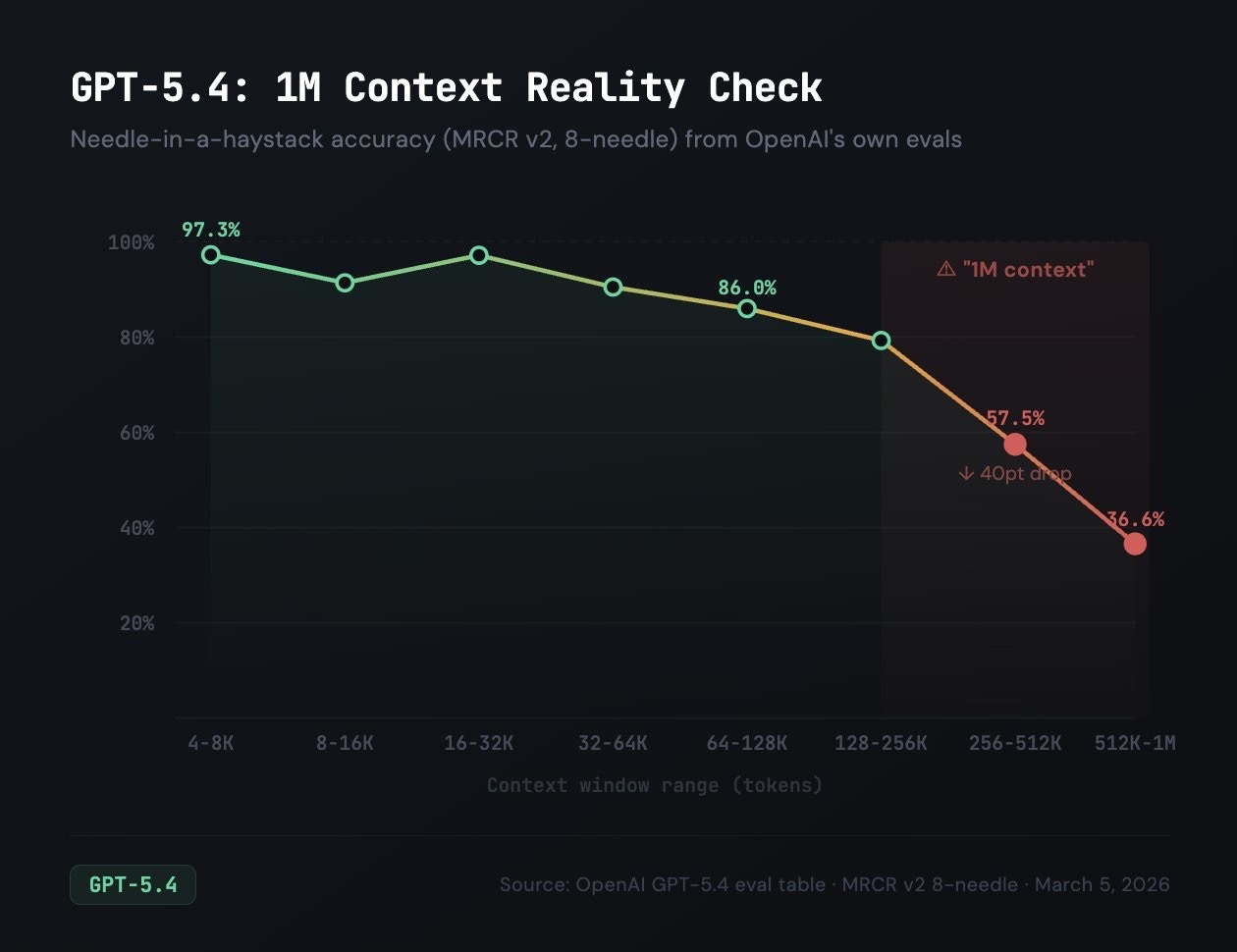
如果你觉得需要更长上下文,也许真正需要的只是更好的上下文窗口隔离。子 Agent 从结构上解决这一问题:每个子 Agent 都获得一个全新、较小、与任务高度相关的上下文窗口,以及一份新的“指令预算”;只有精简结果返回父 Agent。这样,就能把许多个上下文窗口串联起来,解决同一个问题。
If you think you need longer context, you may just need better context window isolation. Sub-agents solve this structurally: each one gets a fresh, small, high-relevance context window with a fresh "instruction budget" for its task, and only the condensed result flows back to the parent - allowing you to stitch together many context windows for a single problem.
极限情况下大概会像下面这样,不过到了某个程度,你就进入了递归语言模型的领域。
The limit case probably looks something like this, although at some point you're crossing Recursive Language Model territory.
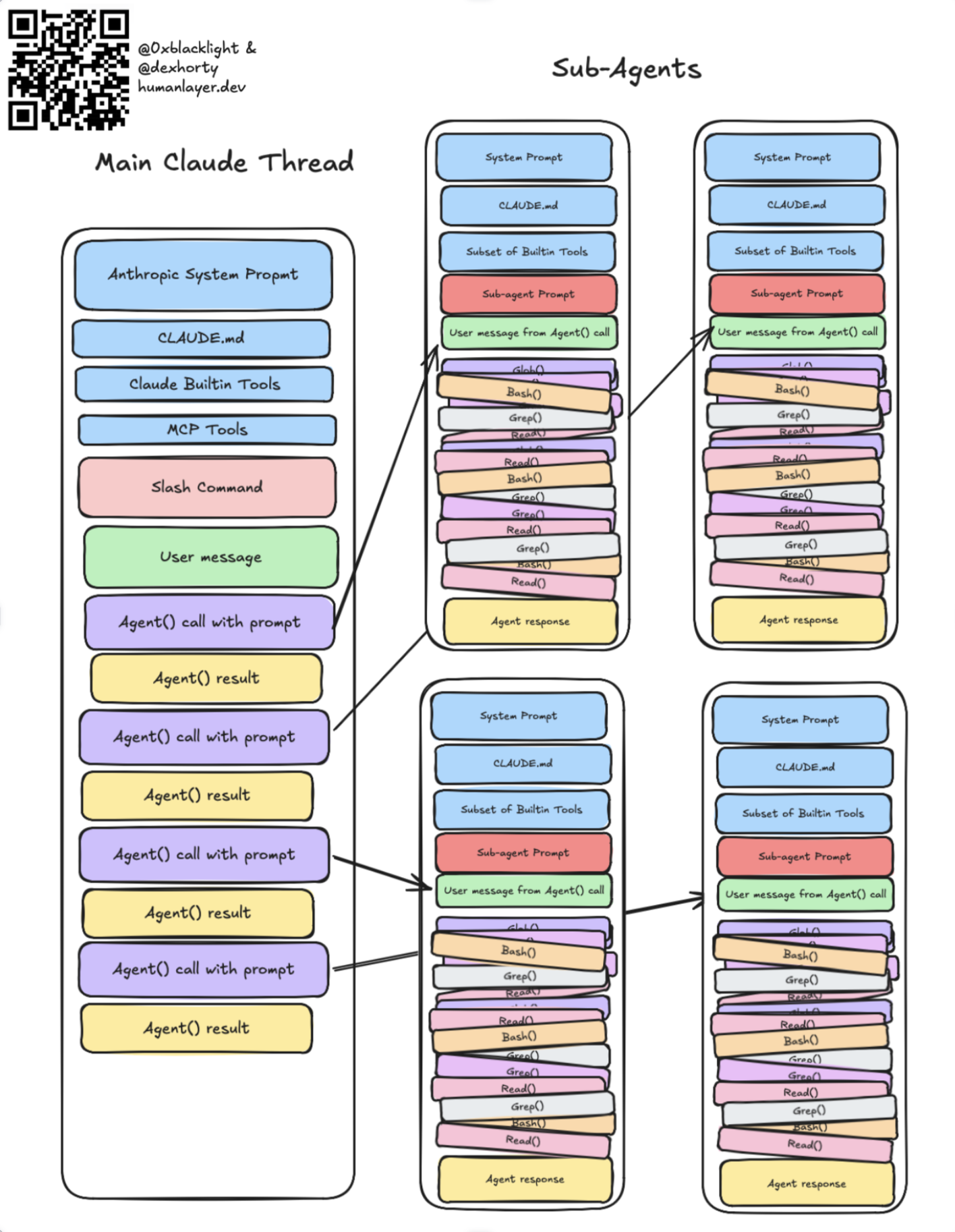
(注:为简洁起见,省略了部分箭头。)
(Note: some arrows omitted for brevity.)
子 Agent 的使用场景
Sub-Agent Use-Cases
以下是一些特别适合使用子 Agent 的任务:
Great examples of things to use sub-agents for include:
- 在代码库中定位特定定义或实现。
- 分析代码库,识别某类工作的惯用模式。
- 追踪信息在代码库中的流动,例如追踪跨服务边界的请求。
- 其他一般性的代码、文档或网页研究任务。
- Locating specific definitions or implementations in the codebase
- Analyzing the codebase to identify patterns for a specific type of work
- Tracing the flow of information through the codebase, e.g. tracing a request across service boundaries
- Other general code/documentation/web research tasks
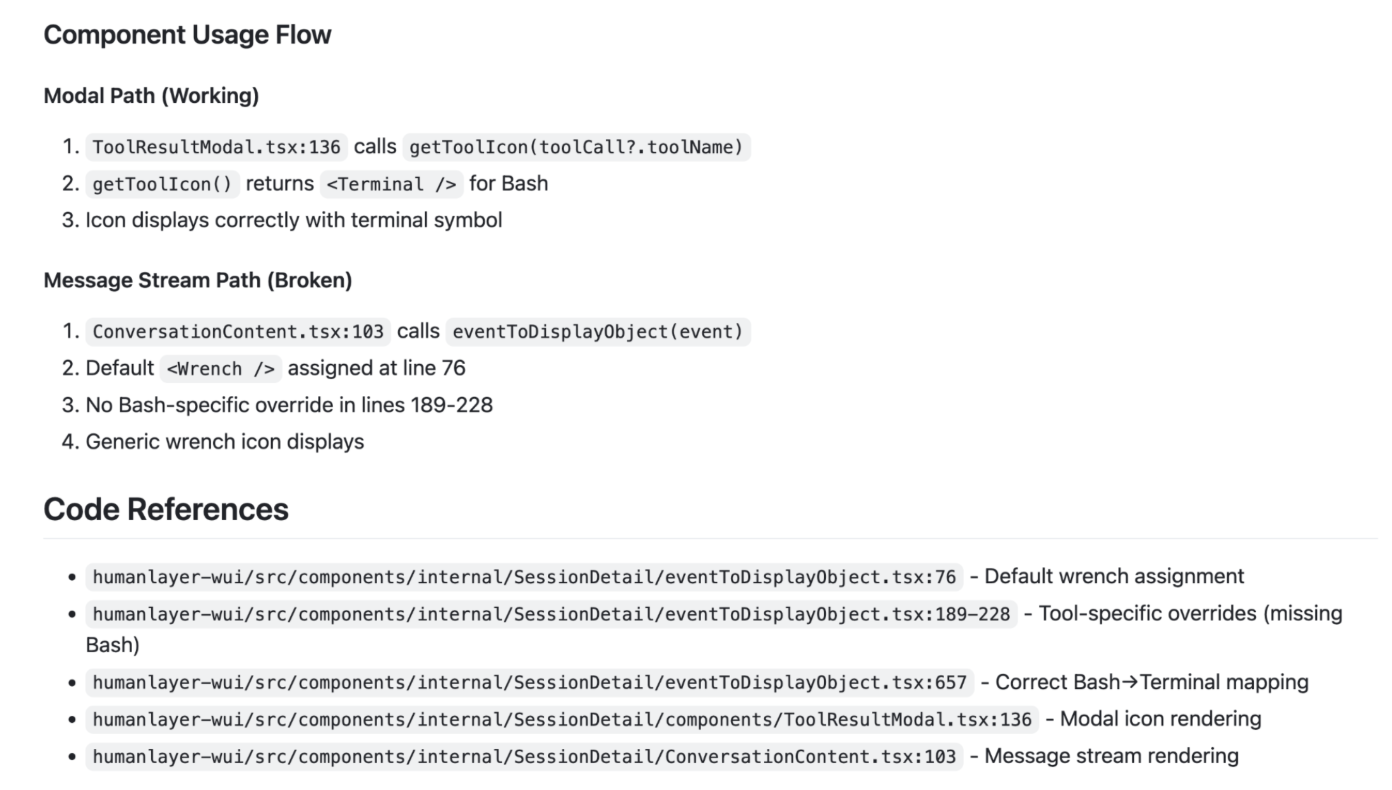
这类任务的问题通常直接、答案通常简单,却需要大量你不想、也不必放进父会话的中间工具调用。子 Agent 应返回高度精简、同时遵循渐进式披露原则的回答。例如,我们的子 Agent 不仅回答问题,也会以 filepath:line 格式或 URL 引用来源。这样,父 Agent 不会接触到子 Agent 使用过的全部材料,但如果需要更多细节或确认,也有足够信息找到相关上下文:
These types of tasks often have a straightforward question and simple answer, but require lots of intermediate tool calls that you don't want or need in your parent session. Sub-agents should return highly condensed responses that also follow the principle of progressive disclosure. For example, our sub-agents provide an answer to the question but also cite sources in filepath:line format or with URLs so that the parent agent isn't exposed to all the sources the sub-agent used, but if it needs more details or confirmation, it has the information that it needs to go find the relevant context:
Dex 在这里更详细地讨论了这一点。
Dex spoke about this more extensively here.
Claude Code 和一些其他编程 Agent 甚至内置了针对特定任务的子 Agent。例如,Claude Code 的 Explore 子 Agent 用于探索代码库;其 Bash 子 Agent 则专门执行输出冗长的 bash 命令,提取信息后返回父 Agent,避免污染父 Agent 的上下文。其他一些编程 Agent 虽然支持子 Agent,却没有预定义角色,用户需要时必须手动配置。
Claude Code and some other coding agents even provide built-in, task-specific sub-agents, e.g. Claude Code's Explore sub-agent for codebase exploration, or their Bash sub-agent which is designed to execute verbose bash commands and extract information to return to the parent agent without polluting its context. Other coding agents support sub-agents but don't define their own, and require that the user manually configure them if desired.
子 Agent 也用于控制成本
Sub-Agents Are (Also) for Cost Control
子 Agent 也有助于控制成本。我们在负责规划、编排等重推理任务的父会话中使用昂贵模型 Opus,在各个子 Agent 中则使用 Sonnet 或 Haiku 等更便宜、更快的模型。子 Agent 接收的任务更小、更独立,智能程度较低、“指令预算”较少的模型也能处理,没必要把 Opus 的 token 烧在一次代码库 grep 搜索上。
Sub-agents can also help with cost control. We use an expensive model (Opus) for the parent session where thinking-heavy tasks like planning and orchestration happen, and a cheaper, faster model like Sonnet or Haiku for each sub-agent. Sub-agents receive much smaller and more discrete tasks that can be handled by a less-intelligent model with a smaller "instruction budget" — no need to burn Opus tokens on a codebase grep.
听说你喜欢子 Agent
So We Heard You Like Sub-Agents
有些运行框架完全不支持子 Agent!就连 Codex 也是最近才开始支持,而且支持仍处于实验阶段。
Some harnesses don't support sub-agents at all! Even Codex didn't until recently, and support is still experimental.
好在,你仍然可以通过编写一个 MCP 服务器来使用这种强大的上下文封装模式。服务器提供一个用于启动新 Agent 会话的工具:接收父 Agent 的提示,将它作为用户消息启动一个新的编程 Agent 会话,再将子 Agent 的最终回答返回给父 Agent。
Fortunately you can still use this powerful context encapsulation pattern by writing an MCP server that provides a tool for launching a new agent session which receives a prompt from the parent agent, launches a new coding agent session with that prompt as the user message, and which returns the sub-agent's final response message to the parent.
一个实现此功能的非常粗略的服务器示例,可以在这里找到。警告:如果在本就支持子 Agent 的编程 Agent 中使用这种模式,框架原生子 Agent 就能通过 MCP 再派发子 Agent,可能演变成一场无法预测的传话游戏:
A very rough approximation of a server to do this can be found here. Warning: using this pattern with a coding agent that supports sub-agents will allow the harness's native sub-agents to dispatch sub-agents via MCP. This can result in an unpredictable game of telephone:
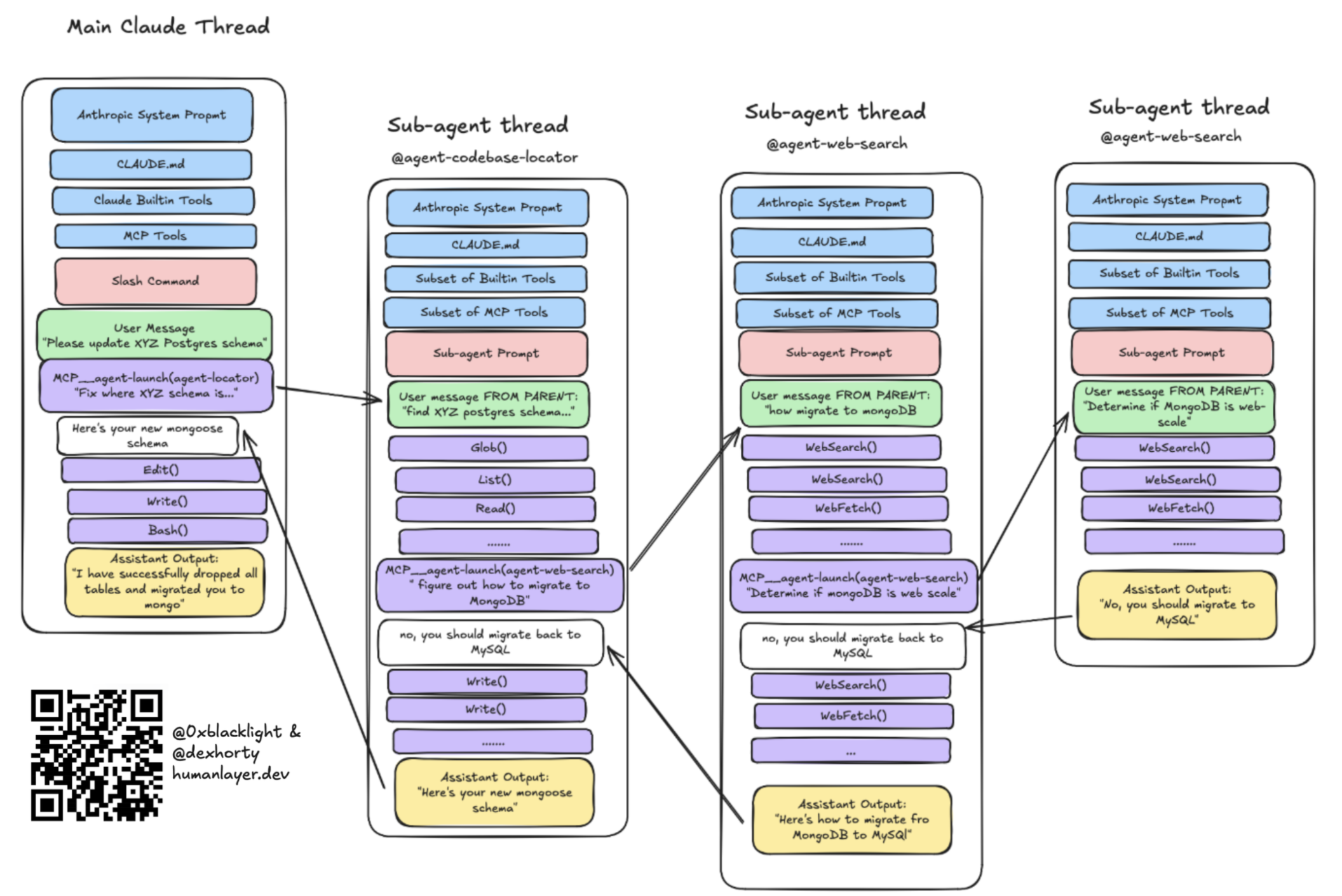
玩笑归玩笑,实际编写子 Agent 的系统提示词时,你必须非常谨慎,清楚限定其角色范围:
Jokes aside, practically you have to be very careful when you write your sub-agents' system prompts to carefully specify the scope of their role:
- Agent 的角色是什么:应该做什么,也包括不应该做什么?
- 应该返回哪些信息,以及如何返回?
- 子 Agent 应该拥有哪些工具?
- What is the agent's role - what should it do, but also what should it not do
- What information should the agent return, and how should it return it
- What tools should the sub-agent have?
还要注意,许多框架为 MCP 工具调用设置了超时;实现这种模式时,可能需要提高框架中的 MCP 工具调用超时时间。
It's also worth noting that many harnesses have an MCP tool call timeout - if you implement this pattern, you may need to configure your harness to increase the MCP tool call timeout.
钩子用于控制流
Hooks Are for Control Flow
Claude Code 提供钩子概念:用户定义的命令或脚本,在特定事件发生时、或 Agent 生命周期的不同节点自动执行。类似地,Opencode 有插件概念,实现同样的功能。其他编程 Agent 也可能有类似配置点。(遗憾的是,Codex 没有对应机制。)
Claude Code has the concept of hooks: user-defined commands or scripts that are automatically executed when certain events occur and at various points of the agent's lifecycle. Similarly, Opencode has the concept of plugins which do the same thing. Other coding agents may have similar configuration points. (Sadly, Codex doesn't have an equivalent.)
Hooks are conceptually similar to git hooks, but they're quite flexible. They can be used to add new features, integrate with external services, automate routine actions, modify permissions, and configure default behavior.
不同运行框架的实现细节各异,但一般来说,钩子可以:
Implementation details vary between harnesses, but generally a hook can:
- 在事件发生时自动、静默地执行某项操作。
- 在工具被调用时运行,并在工具结果之外,向 Agent 返回额外上下文。
- 在编程 Agent 结束前向其呈现构建或类型错误,迫使它继续工作,直到解决错误。
- run something automatically but silently when an event occurs
- run when a tool is called, and return additional context to the agent in addition to the tool result
- surface build/type errors to a coding agent before it finishes, so that it's forced to keep working until it resolves the error
常见用途包括……
Common use cases include...
通知:我们让 Agent 在完成工作或需要关注时播放声音,例如某次审批等待了太久。
审批:我们基于输入值,以及比编程 Agent 默认权限模型更有表达力的规则,自动批准或拒绝工具调用。例如,任何试图执行迁移的
Bash()调用都会被自动拒绝,并附带指令,让 Agent 请用户改为亲自运行。集成:我们让 Agent 在完成后发送 Slack 消息、创建 GitHub PR,或搭建预览环境。
验证:如果你的框架和仓库能在短短几秒内完成类型检查或构建,就在 Agent 每次停止时运行,将错误反馈给它;下面的钩子正是这样做的。
Notifications: We wire our agents up to play sounds when they finish or when they need attention (e.g. an approval has been pending for too long)
Approvals: We automatically approve or deny tool calls based on input values and more expressive rules than the coding agent’s default permissions model. For example, we automatically deny any
Bash()tool calls that try to run migrations, with an instruction to ask the user to run them instead.Integrations: We have our agents send a Slack message when they’re finished, create a GitHub PR, or set up a preview environment.
Verification: If your framework and repository can run a typecheck or build in under a handful of seconds, run it every time the agent stops to surface errors to it — this is exactly what the hook below does.
一个钩子示例
An Example Hook
下面是我借助 Claude 为我们的仓库编写的钩子,实现了刚才的最后一个例子。Claude 停止时,它运行 biome 格式化工具和 TypeScript 类型检查。如果有错误,就反馈给 Claude;如果没有,脚本静默退出。
Here's a hook I (via Claude) wrote for our repo which implements the last example I gave. When Claude stops, it runs our biome formatter and TypeScript type checks. If there are errors, they are raised to Claude. If not, the script exits silently.
成功时,钩子完全静默,没有任何内容进入 Agent 上下文。失败时,只呈现错误;退出码 2 告诉运行框架重新唤起 Agent,让它修复问题后再结束。
On success the hook is completely silent — nothing ends up in the agent's context. On failure, only the errors are surfaced, and exit code 2 tells the harness to re-engage the agent so it fixes them before finishing.
反压提高成功机会
Back-Pressure Increases Your Chances of Success
我们此前写过反压。核心认识是:用编程 Agent 成功解决问题的可能性,与 Agent 验证自己工作的能力高度相关。我们花了很多时间,在仓库中构建测试和其他反压机制;它至今仍是我们投入时间后回报最大的事情之一。
We've written about back-pressure before. The core insight is that your likelihood of successfully solving a problem with a coding agent is strongly correlated with the agent's ability to verify its own work. We've spent a lot of time building out tests and other back-pressure mechanisms into our repository, and it remains one of the highest-leverage things we have spent time on.
我们的代码库提供了一些验证机制,让 Agent 检查自己的工作:
Our codebase has verification mechanisms that allow the agent to check its own work:
- 类型检查和构建步骤,可能最好使用强类型语言。
- 单元测试和/或集成测试。
- 代码覆盖率报告;我们有一个
Stop钩子,在覆盖率下降时提示 Agent 提高覆盖率。 - 界面交互和测试集成,例如 playwright、agent-browser 等。
- typechecks and build steps (probably in a strongly-typed language)
- unit tests and/or integration tests
- code coverage reporting (we have a
Stophook that prompts the agent to increase coverage if it drops) - UI interaction and testing integrations (playwright, agent-browser, etc)
关键是,这些验证机制必须节省上下文。我们为此吃过苦头:早期,我们让 Agent 每次改动后运行完整测试套件,结果 4,000 行测试通过日志淹没了上下文窗口。Agent 随后会忘记实际任务,开始围绕刚读到的测试文件产生幻觉。现在,我们吞掉输出,只呈现错误。构建也采用同样方式:成功时静默,只有失败才输出详细信息。
Critically, these verification mechanisms need to be context-efficient. We learned this one the hard way — early on we had our agent run the full test suite after every change, and 4,000 lines of passing tests would flood the context window. The agent would then lose track of the actual task and start hallucinating about test files it had just read. Now we swallow the output and only surface errors. We do the same with builds — success is silent, and only failures produce verbose output.
我们在 CLAUDE.md 中用简洁指令告诉 Claude 如何使用所有这些机制。有些机制甚至打包在技能里,以实现渐进式披露。
We give Claude concise instructions about how to use all of these mechanisms in our CLAUDE.md file. Some are even bundled inside skills for progressive disclosure.
结语
Closing Notes
优化编程 Agent 配置所花的时间,完全可能超过真正用它交付代码的时间。我们就经历过。
It is entirely possible to spend more time optimizing your coding agent setup than actually shipping code with it — we’ve been there.
我们的原则是优先交付。只有当运行框架配置确实让我们更快交付更多高质量代码时,我们才投入时间。Agent 失败后,我们会花时间设计工程解决方案,让它不再以同样方式失败;但不会主动寻找尚未发生的问题,抢先解决。
Our approach: bias towards shipping. We only spend time on harness configuration to the extent that it’s actually enabling us to ship more high-quality code faster. When the agent fails, we take the time to engineer a solution so it doesn’t fail that way again — but we don’t go looking for problems to solve preemptively.
对我们无效的做法:
What didn’t work for us:
- 还没有遇到真实失败,就试图预先设计理想的运行框架配置。
- “以防万一”,安装几十个技能和 MCP 服务器。
- 每次 Agent 会话结束都运行整个测试套件,耗时超过 5 分钟;应改为运行一个子集。
- 试图精细优化各个子 Agent 可以访问哪些工具。这导致大量无效的工具尝试与切换,结果更差,并没有更好。况且,大多数编程 Agent 也没有足够完善的配置接口支持这件事。
- Trying to design the ideal harness configuration upfront before we’d even hit real failures
- Installing dozens of skills and MCP servers "just in case"
- Running our entire test suite (5+ minutes) at the end of every agent session (run a subset instead)
- Trying to micro-optimize which sub-agents could access which tools. This led to a lot of tool thrash which gave us worse results, not better ones. Most coding agents don't have a robust configuration surface for this anyways.
真正有效的做法:
What did work:
- 从简单配置开始,只有 Agent 实际失败时才添加配置。
- 设计、测试、迭代,并丢弃没有帮助的东西。我扔掉的钩子,远比我们今天实际使用的多。
- 通过仓库级配置,将经过实战检验的设置分发给整个团队。
- 优化迭代速度,而不是“第一次就一次成功的概率”。
- 先给 Agent 一组能力,例如 Linear,再在了解实际需要后,仔细削减暴露给模型的部分。
- Starting simple and adding configuration only when the agent actually failed
- Designing, testing, iterating — and throwing away things that didn’t help. I have thrown away many more hooks than we actually use today.
- Distributing battle-tested configurations to the whole team via repository-level config
- Optimizing for iteration speed, not "likelihood of 1-shotting it on the first attempt"
- Giving the agent a set of capabilities (Linear) and then carefully paring down what we exposed to the model once we knew what we needed.
下次编程 Agent 的表现不如预期时,先别急着怪模型,检查一下运行框架。Agent 指令文件、MCP 服务器、技能、子 Agent、钩子和反压机制,是我们找到大部分改进空间的地方。模型大概没什么问题,只是个“技能问题”。
The next time your coding agent isn’t performing the way you expect, before you blame the model, check the harness. Agentfiles, MCP servers, skills, sub-agents, hooks, and back-pressure — that’s where we’ve found most of the leverage. The model is probably fine. It’s just a skill issue.
— 全文完 —
原文来自 HumanLayer,中文为非官方学习译文。
查看原始出处 ↗