
编程 Agent 正在迅速改变软件的构建方式。它们的快速进步,既来自更强的 Agent 模型,也来自更好的上下文工程对模型的引导。
Coding agents are quickly changing how software is built. Their rapid improvement comes from both improved agentic models and better context engineering to steer them.
Cursor 的 Agent 运行框架,也就是我们提供给模型的指令和工具,会针对每个新支持的前沿模型单独优化。不过,有些上下文工程改进适用于框架中的所有模型,例如如何收集上下文,以及如何在漫长的执行轨迹中优化 token 使用。
Cursor's agent harness, the instructions and tools we provide the model, is optimized individually for every new frontier model we support. However, there are context engineering improvements we can make, such as how we gather context and optimize token usage over a long trajectory, that apply to all models inside our harness.
随着模型作为 Agent 的能力增强,我们发现,预先提供更少细节、让 Agent 更容易自行获取相关上下文,能够取得良好效果。我们将这种模式称为动态上下文发现,与始终包含在输入中的静态上下文相对。
As models have become better as agents, we've found success by providing fewer details up front, making it easier for the agent to pull relevant context on its own. We're calling this pattern dynamic context discovery, in contrast to static context which is always included.
用文件实现动态上下文发现
Files for dynamic context discovery
动态上下文发现只将必要数据放入上下文窗口,因此 token 效率高得多。它还能减少窗口内可能造成困惑或相互矛盾的信息,从而改善 Agent 的回答质量。
Dynamic context discovery is far more token-efficient, as only the necessary data is pulled into the context window. It can also improve the agent's response quality by reducing the amount of potentially confusing or contradictory information in the context window.
我们在 Cursor 中这样运用动态上下文发现:
Here's how we've used dynamic context discovery in Cursor:
- 将冗长的工具响应转为文件。
- 在总结上下文时引用聊天历史。
- 支持 Agent Skills 开放标准。
- 高效地只加载需要的 MCP 工具。
- 将所有集成终端会话视为文件。
- Turning long tool responses into files
- Referencing chat history during summarization
- Supporting the Agent Skills open standard
- Efficiently loading only the MCP tools needed
- Treating all integrated terminal sessions as files
1. 将冗长的工具响应转为文件
1. Turning long tool responses into files
工具调用可能返回庞大的 JSON 响应,使上下文窗口占用急剧增加。
Tool calls can dramatically increase the context window by returning a large JSON response.
对于 Cursor 的第一方工具,例如文件编辑和代码库搜索,我们可以通过合理的工具定义和精简响应格式,防止上下文膨胀;但第三方工具,例如 Shell 命令或 MCP 调用,原生并没有得到同样的处理。
For first-party tools in Cursor, like editing files and searching the codebase, we can prevent context bloat with intelligent tool definitions and minimal response formats, but third-party tools (i.e. shell commands or MCP calls) don't natively get this same treatment.
编程 Agent 常见的做法,是截断冗长的 Shell 命令输出或 MCP 结果。这会导致数据丢失,其中可能就包含你希望保留在上下文中的重要信息。Cursor 则将输出写入文件,并赋予 Agent 读取它的能力。Agent 先调用 tail 查看末尾,如果有需要,再读取更多内容。
The common approach coding agents take is to truncate long shell commands or MCP results. This can lead to data loss, which could include important information you wanted in the context. In Cursor, we instead write the output to a file and give the agent the ability to read it. The agent calls tail to check the end, and then read more if it needs to.
这样,在接近上下文上限时,就能减少不必要的总结操作。
This has resulted in fewer unnecessary summarizations when reaching context limits.
2. 在总结上下文时引用聊天历史
2. Referencing chat history during summarization
当模型的上下文窗口填满时,Cursor 会触发总结步骤,让 Agent 获得一个新的上下文窗口,其中包含此前工作进展的摘要。
When the model's context window fills up, Cursor triggers a summarization step to give the agent a fresh context window with a summary of its work so far.
但总结是一种有损上下文压缩,因此总结后,Agent 掌握的信息可能退化。它可能遗忘任务中的关键细节。在 Cursor 中,我们将聊天历史作为文件保存,以提高总结后的效果。
But the agent's knowledge can degrade after summarization since it's a lossy compression of the context. The agent might have forgotten crucial details about its task. In Cursor, we use the chat history as files to improve the quality of summarization.
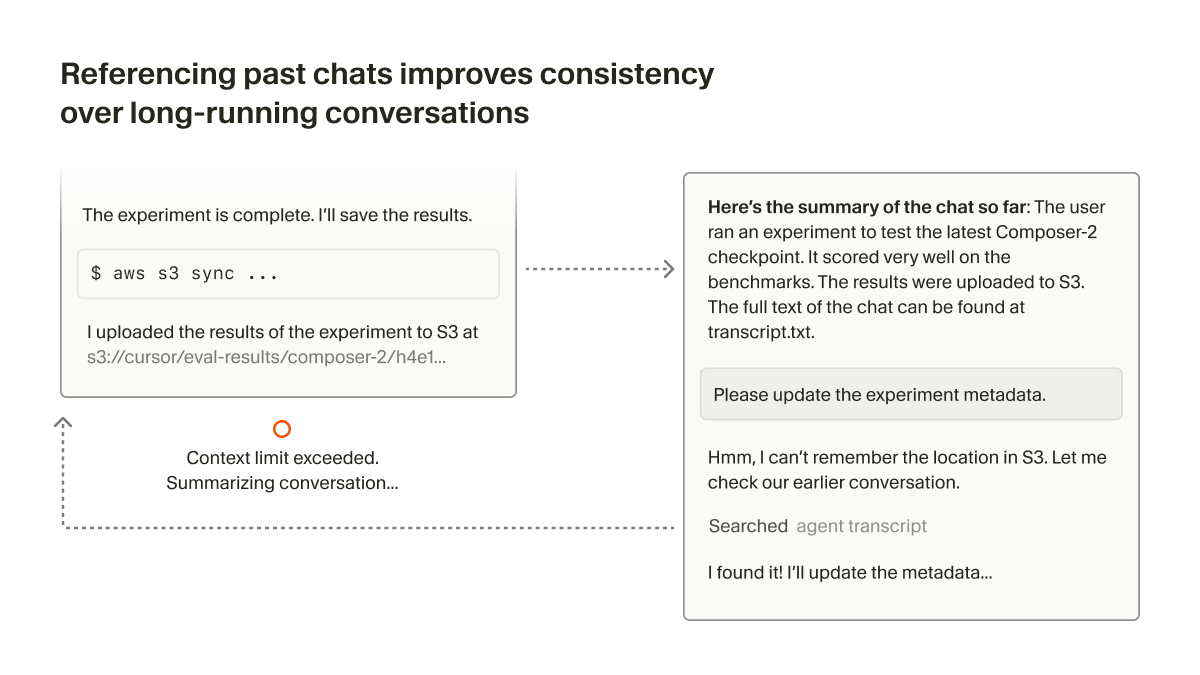
当达到上下文窗口上限,或用户决定手动总结时,我们会向 Agent 提供历史文件的引用。如果 Agent 意识到自己需要摘要中缺失的更多细节,就可以搜索历史记录,将它们找回来。
After the context window limit is reached, or the user decides to summarize manually, we give the agent a reference to the history file. If the agent knows that it needs more details that are missing from the summary, it can search through the history to recover them.
3. 支持 Agent Skills 开放标准
3. Supporting the Agent Skills open standard
Cursor 支持 Agent Skills,这是一项为编程 Agent 扩展专业能力的开放标准。与其他类型的规则类似,技能由文件定义,告诉 Agent 如何执行特定领域的任务。
Cursor supports Agent Skills, an open standard for extending coding agents with specialized capabilities. Similar to other types of Rules, Skills are defined by files that tell the agent how to perform on a domain-specific task.
技能还包含名称和描述,可以作为“静态上下文”加入系统提示词。随后,Agent 可以借助 grep、Cursor 的语义搜索等工具,动态发现上下文并引入相关技能。
Skills also include a name and description which can be included as "static context" in the system prompt. The agent can then do dynamic context discovery to pull in relevant skills, using tools like grep and Cursor's semantic search.
技能还可以打包与任务相关的可执行程序或脚本。因为它们都只是文件,Agent 很容易找到与某项技能相关的内容。
Skills can also bundle executables or scripts relevant to the task. Since they're just files, the agent can easily find what's relevant to a particular skill.
4. 高效地只加载需要的 MCP 工具
4. Efficiently loading only the MCP tools needed
MCP 有助于访问受 OAuth 保护的资源,例如生产日志、外部设计文件,或企业内部上下文和文档。
MCP is helpful for accessing secured resources behind OAuth. That could be production logs, external design files, or internal context and documentation for an enterprise.
一些 MCP 服务器包含很多工具,而且描述通常很长,会显著占用上下文窗口。这些工具虽然始终放在提示词中,大部分却从未被使用。如果接入多个 MCP 服务器,问题还会进一步累积。
Some MCP servers include many tools, often with long descriptions, which can significantly bloat the context window. Most of these tools go unused even though they are always included in the prompt. This compounds if you use multiple MCP servers.
指望每个 MCP 服务器都为此做优化并不现实。我们认为,减少上下文占用是编程 Agent 的责任。Cursor 通过将工具描述同步到文件夹,支持对 MCP 进行动态上下文发现。1
It's not feasible to expect every MCP server to optimize for this. We believe it's the responsibility of the coding agents to reduce context usage. In Cursor, we support dynamic context discovery for MCP by syncing tool descriptions to a folder.1
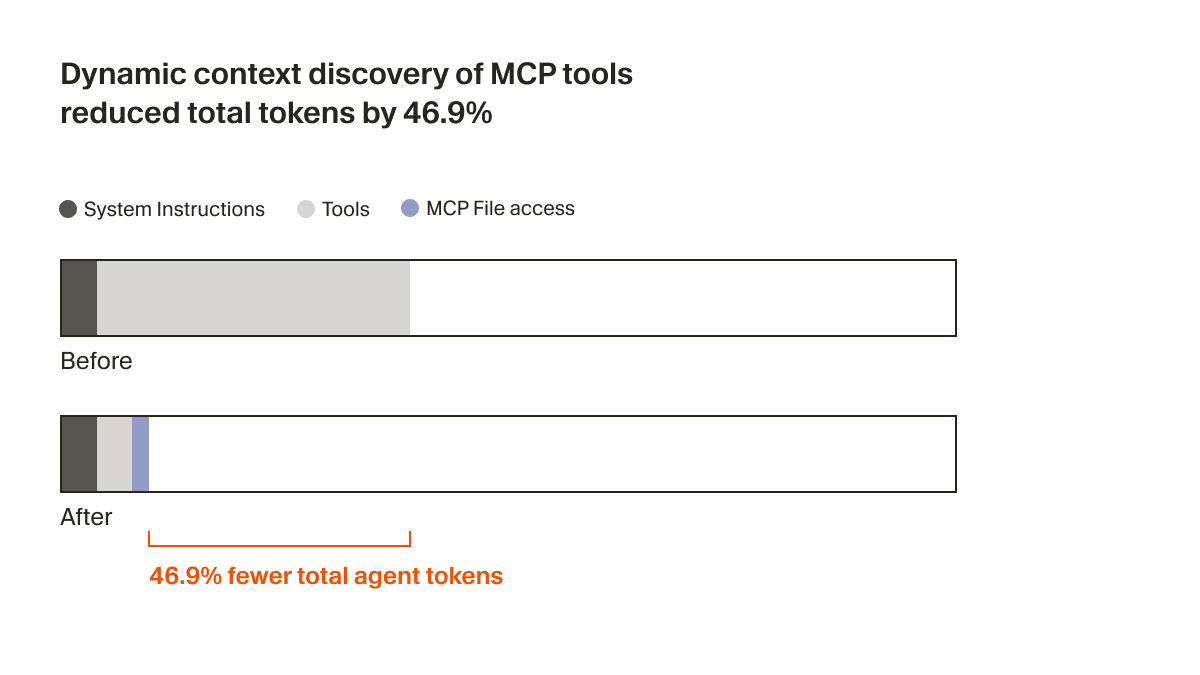
现在,Agent 只会收到包含工具名称在内的少量静态上下文,并被提示在任务需要时查找工具。在一项 A/B 测试中,我们发现,对于调用了 MCP 工具的运行,这种策略将 Agent 的总 token 消耗降低了 46.9%;这一结果具有统计显著性,但方差较大,取决于安装的 MCP 数量。
The agent now only receives a small bit of static context, including names of the tools, prompting it to look up tools when the task calls for it. In an A/B test, we found that in runs that called an MCP tool, this strategy reduced total agent tokens by 46.9% (statistically significant, with high variance based on the number of MCPs installed).
文件方式还让我们能够向 Agent 传达 MCP 工具的状态。例如,过去如果某个 MCP 服务器需要重新验证身份,Agent 就会完全忘掉这些工具,让用户感到困惑。现在,它可以主动告诉用户需要重新验证身份。
This file approach also unlocks the ability to communicate the status of MCP tools to the agent. For example, previously if an MCP server needed re-authentication, the agent would forget about those tools entirely, leaving the user confused. Now, it can actually let the user know to re-authenticate proactively.
5. 将所有集成终端会话视为文件
5. Treating all integrated terminal sessions as files
现在,Cursor 会将集成终端的输出同步到本地文件系统,无需再把终端会话输出复制粘贴到 Agent 的输入中。
Rather than needing to copy/paste the output of a terminal session into the agent input, Cursor now syncs the integrated terminal outputs to the local filesystem.
这样,你可以直接问“我的命令为什么失败了?”,Agent 就能理解你指的是什么。由于终端历史可能很长,Agent 可以用 grep 只找出相关输出;对于服务器等长时间运行进程的日志,这一点尤其有用。
This makes it easy to ask "why did my command fail?" and allow the agent to understand what you're referencing. Since terminal history can be long, the agent can grep for only the relevant outputs, which is useful for logs from a long-running process like a server.
这与命令行编程 Agent 能看到此前 Shell 输出的方式相似,但这些内容是动态发现的,而不是静态注入的。
This mirrors what CLI-based coding agents see, with prior shell output in context, but discovered dynamically rather than injected statically.
简单的抽象
Simple abstractions
文件是否会成为基于大语言模型的工具的最终接口,目前还不清楚。
It's not clear if files will be the final interface for LLM-based tools.
但在编程 Agent 快速进步的过程中,文件是一种简单而强大的基础机制。与其再创造一个无法充分预见未来的新抽象,文件是更稳妥的选择。我们还将在这个方向分享更多令人兴奋的工作,敬请关注。
But as coding agents quickly improve, files have been a simple and powerful primitive to use, and a safer choice than yet another abstraction that can't fully account for the future. Stay tuned for lots more exciting work to share in this space.
这些改进将在未来几周内向所有用户上线。本文介绍的技术,是包括 Lukas Moller、Yash Gaitonde、Wilson Lin、Jason Ma、Devang Jhabakh 和 Jediah Katz 在内的许多 Cursor 员工共同努力的成果。如果你有兴趣使用 AI 解决最困难、最有雄心的编程任务,我们很乐意与你交流。请通过 hiring@cursor.com 联系我们。
These improvements will be live for all users in the coming weeks. The techniques described in this blog post are the work of many Cursor employees including Lukas Moller, Yash Gaitonde, Wilson Lin, Jason Ma, Devang Jhabakh, and Jediah Katz. If you are interested in solving the hardest and most ambitious coding tasks using AI, we'd love to hear from you. Reach out to us at hiring@cursor.com.
- 我们考虑过工具搜索的方式,但那会把工具散布在一个扁平索引中。我们选择为每个服务器创建一个文件夹,保持该服务器的工具在逻辑上成组。当模型列出一个文件夹时,会一起看到该服务器的全部工具,并能够将它们理解为一个协调的整体。文件还支持更强大的搜索:Agent 可以使用
rg的完整参数,甚至使用jq过滤工具描述。↩
- We considered a tool search approach, but that would scatter tools across a flat index. Instead, we create one folder per server, keeping each server's tools logically grouped. When the model lists a folder, it sees all tools from that server together and can understand them as a cohesive unit. Files also enable more powerful searching. The agent can use full
rgparameters or evenjqto filter tool descriptions. ↩
— 全文完 —
原文来自 Cursor,中文为非官方学习译文。
查看原始出处 ↗