

直接调用工具时,每个工具定义和返回结果都会占用上下文。让 Agent 编写代码来调用工具,则更有利于扩展规模。下面介绍这种方式如何与 MCP 配合。
Direct tool calls consume context for each definition and result. Agents scale better by writing code to call tools instead. Here's how it works with MCP.
模型上下文协议(MCP)是一项将 AI Agent 连接到外部系统的开放标准。传统上,每一种 Agent 与工具或数据的配对都需要定制集成,由此产生的碎片化和重复劳动,使真正互联的系统难以扩展。MCP 提供了一种通用协议:开发者只需在 Agent 中实现一次 MCP,就能接入整个集成生态。
The Model Context Protocol (MCP) is an open standard for connecting AI agents to external systems. Connecting agents to tools and data traditionally requires a custom integration for each pairing, creating fragmentation and duplicated effort that makes it difficult to scale truly connected systems. MCP provides a universal protocol—developers implement MCP once in their agent and it unlocks an entire ecosystem of integrations.
Since launching MCP in November 2024, adoption has been rapid: the community has built thousands of MCP servers, SDKs are available for all major programming languages, and the industry has adopted MCP as the de-facto standard for connecting agents to tools and data.
如今,开发者经常构建能够通过数十个 MCP 服务器访问数百乃至数千个工具的 Agent。然而,随着连接的工具增多,一开始就加载所有工具定义,以及让中间结果经过上下文窗口,都会拖慢 Agent 的运行速度并增加成本。
Today developers routinely build agents with access to hundreds or thousands of tools across dozens of MCP servers. However, as the number of connected tools grows, loading all tool definitions upfront and passing intermediate results through the context window slows down agents and increases costs.
本文将探讨如何借助代码执行,让 Agent 更高效地与 MCP 服务器交互,在使用更少 token 的同时处理更多工具。
In this blog we'll explore how code execution can enable agents to interact with MCP servers more efficiently, handling more tools while using fewer tokens.
工具消耗过多 token,会降低 Agent 的效率
Excessive token consumption from tools makes agents less efficient
随着 MCP 使用规模扩大,两种常见模式会增加 Agent 的成本和时延:
As MCP usage scales, there are two common patterns that can increase agent cost and latency:
- 工具定义使上下文窗口不堪重负;
- 工具中间结果消耗额外的 token。
- Tool definitions overload the context window;
- Intermediate tool results consume additional tokens.
1. 工具定义使上下文窗口不堪重负
1. Tool definitions overload the context window
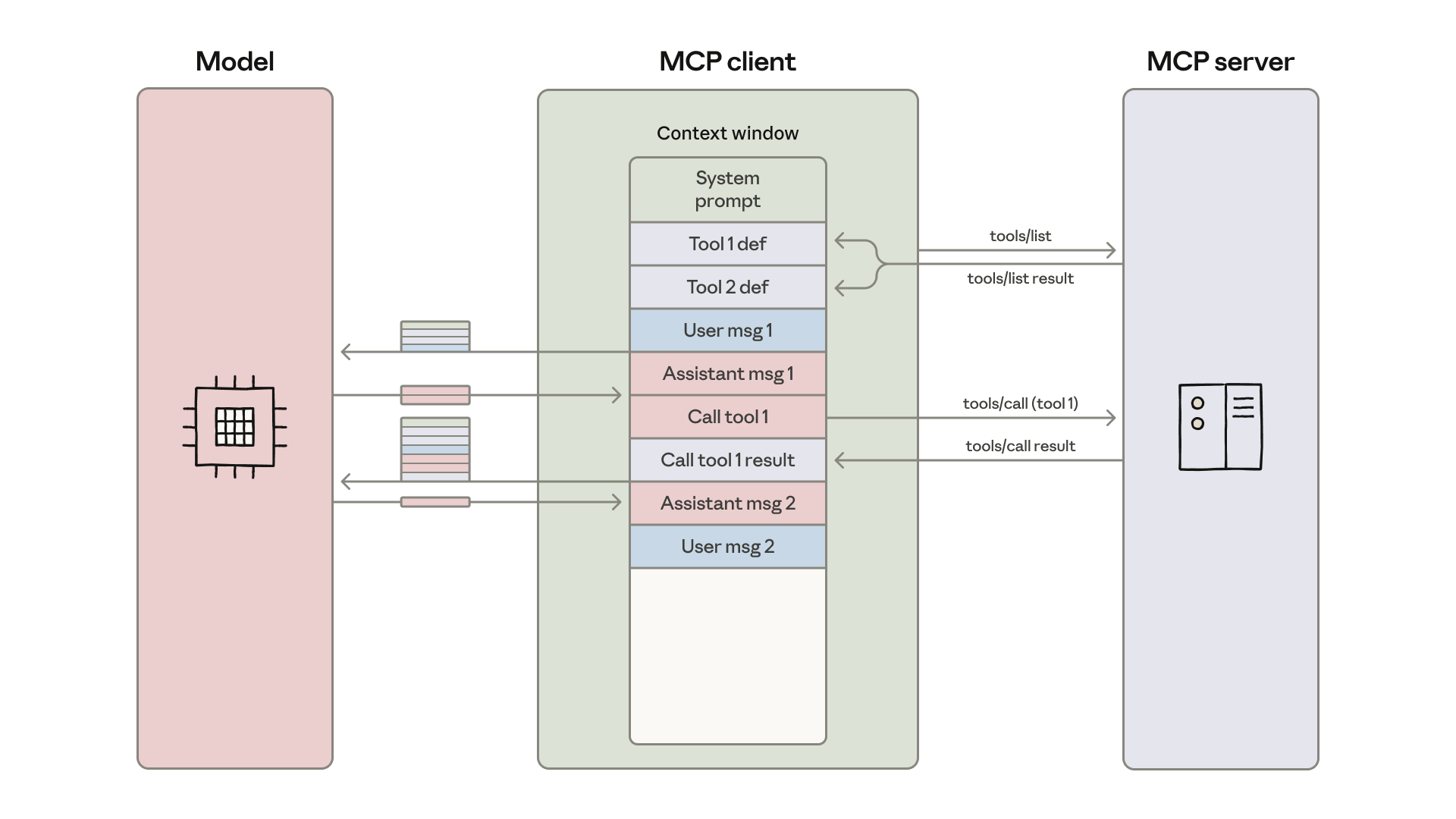
大多数 MCP 客户端会预先将全部工具定义直接加载进上下文,通过直接工具调用的语法将其提供给模型。这些工具定义可能如下所示:
Most MCP clients load all tool definitions upfront directly into context, exposing them to the model using a direct tool-calling syntax. These tool definitions might look like:
工具描述会占用更多上下文窗口空间,增加响应时间与成本。当 Agent 连接了数千个工具时,它甚至还没读到用户请求,就需要先处理数十万个 token。
Tool descriptions occupy more context window space, increasing response time and costs. In cases where agents are connected to thousands of tools, they’ll need to process hundreds of thousands of tokens before reading a request.
2. 工具中间结果消耗额外的 token
2. Intermediate tool results consume additional tokens
大多数 MCP 客户端允许模型直接调用 MCP 工具。例如,你可能要求 Agent:“从 Google Drive 下载我的会议转录,并将它附加到 Salesforce 的销售线索上。”
Most MCP clients allow models to directly call MCP tools. For example, you might ask your agent: "Download my meeting transcript from Google Drive and attach it to the Salesforce lead."
模型会进行类似下面的调用:
The model will make calls like:
每个中间结果都必须经过模型。在这个例子中,完整的通话转录会流经模型两次。对于一场两小时的销售会议,这可能意味着需要额外处理 50,000 个 token。更大的文档甚至可能超出上下文窗口限制,导致工作流中断。
Every intermediate result must pass through the model. In this example, the full call transcript flows through twice. For a 2-hour sales meeting, that could mean processing an additional 50,000 tokens. Even larger documents may exceed context window limits, breaking the workflow.
面对大型文档或复杂数据结构时,模型在不同工具调用之间复制数据,也更容易出错。
With large documents or complex data structures, models may be more likely to make mistakes when copying data between tool calls.
通过代码执行使用 MCP,提高上下文利用效率
Code execution with MCP improves context efficiency
随着代码执行环境在 Agent 中越来越常见,一种解决方案是将 MCP 服务器呈现为代码 API,而非直接工具调用。这样,Agent 就可以编写代码与 MCP 服务器交互。这个方法同时解决了上述两个挑战:Agent 可以只加载自己需要的工具,并在执行环境中处理数据,然后再把结果返回给模型。
With code execution environments becoming more common for agents, a solution is to present MCP servers as code APIs rather than direct tool calls. The agent can then write code to interact with MCP servers. This approach addresses both challenges: agents can load only the tools they need and process data in the execution environment before passing results back to the model.
实现方式有很多。一种方法是为已连接的 MCP 服务器中的所有可用工具生成文件树。下面是一个 TypeScript 实现:
There are a number of ways to do this. One approach is to generate a file tree of all available tools from connected MCP servers. Here's an implementation using TypeScript:
然后,每个工具对应一个文件,大致如下:
Then each tool corresponds to a file, something like:
上面将数据从 Google Drive 传到 Salesforce 的例子,就变成了这样的代码:
Our Google Drive to Salesforce example above becomes the code:
Agent 通过探索文件系统来发现工具:列出 ./servers/ 目录,找到可用服务器,例如 google-drive 和 salesforce;再读取所需的具体工具文件,例如 getDocument.ts 和 updateRecord.ts,了解各个工具的接口。这样,Agent 只需加载当前任务所需的定义。这将 token 用量从 150,000 降到了 2,000,节省了 98.7% 的时间与成本。
The agent discovers tools by exploring the filesystem: listing the ./servers/ directory to find available servers (like google-drive and salesforce), then reading the specific tool files it needs (like getDocument.ts and updateRecord.ts) to understand each tool's interface. This lets the agent load only the definitions it needs for the current task. This reduces the token usage from 150,000 tokens to 2,000 tokens—a time and cost saving of 98.7%.
Cloudflare 也发布了类似发现,将通过代码执行使用 MCP 称为“Code Mode”。核心观点是一样的:大语言模型擅长编写代码,开发者应该利用这一优势,构建能更高效地与 MCP 服务器交互的 Agent。
Cloudflare published similar findings, referring to code execution with MCP as “Code Mode." The core insight is the same: LLMs are adept at writing code and developers should take advantage of this strength to build agents that interact with MCP servers more efficiently.
通过代码执行使用 MCP 的优势
Benefits of code execution with MCP
通过代码执行使用 MCP,可以按需加载工具,在数据到达模型前先行过滤,并一次执行复杂逻辑,从而让 Agent 更高效地利用上下文。这种方法在安全性和状态管理方面也有优势。
Code execution with MCP enables agents to use context more efficiently by loading tools on demand, filtering data before it reaches the model, and executing complex logic in a single step. There are also security and state management benefits to using this approach.
渐进式披露
Progressive disclosure
模型很擅长浏览文件系统。将工具以代码形式放在文件系统中,可以让模型按需读取工具定义,而不必一开始就全部读入。
Models are great at navigating filesystems. Presenting tools as code on a filesystem allows models to read tool definitions on-demand, rather than reading them all up-front.
另一种方式是在服务器中添加一个 search_tools 工具,用来查找相关定义。例如,使用上文假设的 Salesforce 服务器时,Agent 可以搜索“salesforce”,然后只加载当前任务所需的工具。还可以为 search_tools 工具加入一个详细程度参数,让 Agent 选择需要的信息层次,例如仅名称、名称加描述,或包含 schema 的完整定义。这也有助于节约上下文,并高效查找工具。
Alternatively, a search_tools tool can be added to the server to find relevant definitions. For example, when working with the hypothetical Salesforce server used above, the agent searches for "salesforce" and loads only those tools that it needs for the current task. Including a detail level parameter in the search_tools tool that allows the agent to select the level of detail required (such as name only, name and description, or the full definition with schemas) also helps the agent conserve context and find tools efficiently.
节省上下文的工具结果
Context efficient tool results
处理大型数据集时,Agent 可以在代码中先过滤和转换结果,再将其返回。以获取一张 10,000 行的电子表格为例:
When working with large datasets, agents can filter and transform results in code before returning them. Consider fetching a 10,000-row spreadsheet:
Agent 看到的是 5 行,而非 10,000 行。类似模式也适用于聚合、跨多个数据源的连接,或提取特定字段,而且都不会使上下文窗口膨胀。
The agent sees five rows instead of 10,000. Similar patterns work for aggregations, joins across multiple data sources, or extracting specific fields—all without bloating the context window.
更强大、更节省上下文的控制流
More powerful and context-efficient control flow
循环、条件判断和错误处理,都可以使用熟悉的代码模式来实现,而无需串接单独的工具调用。例如,如果你需要在 Slack 中收到部署通知,Agent 可以编写:
Loops, conditionals, and error handling can be done with familiar code patterns rather than chaining individual tool calls. For example, if you need a deployment notification in Slack, the agent can write:
这种方法比在 Agent 循环中交替调用 MCP 工具和 sleep 命令更高效。
This approach is more efficient than alternating between MCP tool calls and sleep commands through the agent loop.
此外,直接写出可执行的条件分支树,还能减少“首 token 时间”带来的延迟:无需等待模型判断 if 语句,Agent 可以让代码执行环境来完成这一步。
Additionally, being able to write out a conditional tree that gets executed also saves on “time to first token” latency: rather than having to wait for a model to evaluate an if-statement, the agent can let the code execution environment do this.
保护隐私的操作
Privacy-preserving operations
Agent 通过代码执行使用 MCP 时,中间结果默认保留在执行环境中。这样,Agent 只会看到你明确记录或返回的内容。这意味着,不希望与模型共享的数据,可以在工作流中流转,而始终不进入模型的上下文。
When agents use code execution with MCP, intermediate results stay in the execution environment by default. This way, the agent only sees what you explicitly log or return, meaning data you don’t wish to share with the model can flow through your workflow without ever entering the model's context.
对于更加敏感的工作负载,Agent 运行框架可以自动用代号替换敏感数据。例如,假设你需要把电子表格中的客户联系方式导入 Salesforce。Agent 会编写:
For even more sensitive workloads, the agent harness can tokenize sensitive data automatically. For example, imagine you need to import customer contact details from a spreadsheet into Salesforce. The agent writes:
MCP 客户端会截获数据,在其到达模型之前,将个人身份信息(PII)替换为代号:
The MCP client intercepts the data and tokenizes PII before it reaches the model:
随后,当这些数据通过另一个 MCP 工具调用传递时,MCP 客户端会通过查表,把代号还原成原始数据。真实的电子邮件地址、电话号码和姓名会从 Google Sheets 流向 Salesforce,但不会经过模型。这可以防止 Agent 意外记录或处理敏感数据。你也可以用这种方式定义确定性的安全规则,选择允许数据从哪里流出、流向哪里。
Then, when the data is shared in another MCP tool call, it is untokenized via a lookup in the MCP client. The real email addresses, phone numbers, and names flow from Google Sheets to Salesforce, but never through the model. This prevents the agent from accidentally logging or processing sensitive data. You can also use this to define deterministic security rules, choosing where data can flow to and from.
状态持久化与 Skills
State persistence and skills
带有文件系统访问能力的代码执行,让 Agent 能够在不同操作之间维持状态。Agent 可以将中间结果写入文件,以便恢复工作并跟踪进展:
Code execution with filesystem access allows agents to maintain state across operations. Agents can write intermediate results to files, enabling them to resume work and track progress:
Agent 还可以把自己编写的代码持久保存为可复用函数。为某个任务开发出可运行的代码后,它就能保存这个实现,供未来使用:
Agents can also persist their own code as reusable functions. Once an agent develops working code for a task, it can save that implementation for future use:
这与 Skills 的概念紧密相关。Skills 是包含可复用指令、脚本和资源的文件夹,用于提高模型在专门任务上的表现。为这些已保存的函数添加一个 SKILL.md 文件,就能形成结构化的技能,供模型查阅和使用。随着时间推移,Agent 可以由此积累一套更高层次能力的工具箱,不断演进出让自己最高效工作的支撑结构。
This ties in closely to the concept of Skills, folders of reusable instructions, scripts, and resources for models to improve performance on specialized tasks. Adding a SKILL.md file to these saved functions creates a structured skill that models can reference and use. Over time, this allows your agent to build a toolbox of higher-level capabilities, evolving the scaffolding that it needs to work most effectively.
需要注意,代码执行也会带来额外复杂性。运行 Agent 生成的代码,需要一个安全的执行环境,具备适当的沙箱隔离、资源限制和监测能力。这些基础设施要求会增加运维开销和安全方面的考量,而直接工具调用则不需要承担这些负担。代码执行带来的好处,包括降低 token 成本、减少时延和改善工具组合能力,应当与这些实现成本一并权衡。
Note that code execution introduces its own complexity. Running agent-generated code requires a secure execution environment with appropriate sandboxing, resource limits, and monitoring. These infrastructure requirements add operational overhead and security considerations that direct tool calls avoid. The benefits of code execution—reduced token costs, lower latency, and improved tool composition—should be weighed against these implementation costs.
总结
Summary
MCP 为 Agent 连接众多工具和系统提供了基础协议。然而,一旦连接的服务器过多,工具定义和结果就可能消耗过量 token,降低 Agent 效率。
MCP provides a foundational protocol for agents to connect to many tools and systems. However, once too many servers are connected, tool definitions and results can consume excessive tokens, reducing agent efficiency.
虽然这里的许多问题,如上下文管理、工具组合和状态持久化,看起来很新,但软件工程中已经存在成熟的解决方案。代码执行将这些既有模式应用到 Agent 中,使其能利用熟悉的编程结构,更高效地与 MCP 服务器交互。如果你实现了这种方法,我们欢迎你与 MCP 社区分享发现。
Although many of the problems here feel novel—context management, tool composition, state persistence—they have known solutions from software engineering. Code execution applies these established patterns to agents, letting them use familiar programming constructs to interact with MCP servers more efficiently. If you implement this approach, we encourage you to share your findings with the MCP community.
致谢
Acknowledgments
本文由 Adam Jones 和 Conor Kelly 撰写。感谢 Jeremy Fox、Jerome Swannack、Stuart Ritchie、Molly Vorwerck、Matt Samuels 和 Maggie Vo 对本文草稿提出的反馈。
This article was written by Adam Jones and Conor Kelly. Thanks to Jeremy Fox, Jerome Swannack, Stuart Ritchie, Molly Vorwerck, Matt Samuels, and Maggie Vo for feedback on drafts of this post.
— 全文完 —
原文来自 Anthropic,中文为非官方学习译文。
查看原始出处 ↗