

Agent 在跨越多个上下文窗口工作时仍面临挑战。我们从人类工程师的工作方式中汲取灵感,为长时间运行的 Agent 创建了更有效的运行框架。
Agents still face challenges working across many context windows. We looked to human engineers for inspiration in creating a more effective harness for long-running agents.
随着 AI Agent 能力不断增强,开发者越来越多地让它们承担需要数小时、甚至数天才能完成的复杂任务。然而,如何让 Agent 在多个上下文窗口之间持续推进工作,仍然是一个尚未解决的问题。
As AI agents become more capable, developers are increasingly asking them to take on complex tasks requiring work that spans hours, or even days. However, getting agents to make consistent progress across multiple context windows remains an open problem.
长时间运行的 Agent 所面临的核心挑战是:它们必须在彼此分离的会话中工作,而每个新会话开始时,都不记得此前发生了什么。设想一个软件项目由轮班工程师负责,每位新上岗的工程师都不记得上一班发生的事情。由于上下文窗口有限,而且大多数复杂项目无法在单个窗口内完成,Agent 需要一种衔接各次编程会话的方法。
The core challenge of long-running agents is that they must work in discrete sessions, and each new session begins with no memory of what came before. Imagine a software project staffed by engineers working in shifts, where each new engineer arrives with no memory of what happened on the previous shift. Because context windows are limited, and because most complex projects cannot be completed within a single window, agents need a way to bridge the gap between coding sessions.
我们开发了一套由两部分组成的方案,让 Claude Agent SDK 能够跨越多个上下文窗口高效工作:首先是初始化 Agent,在首次运行时搭建环境;其次是编程 Agent,在每次会话中逐步推进工作,同时为下一次会话留下清晰的产物。代码示例见配套的快速入门项目。
We developed a two-fold solution to enable the Claude Agent SDK to work effectively across many context windows: an initializer agent that sets up the environment on the first run, and a coding agent that is tasked with making incremental progress in every session, while leaving clear artifacts for the next session. You can find code examples in the accompanying quickstart.
长时间运行的 Agent 面临的问题
The long-running agent problem
Claude Agent SDK 是一个功能强大的通用 Agent 运行框架,擅长编程,也擅长其他需要模型使用工具收集上下文、规划和执行的任务。它具备压缩等上下文管理能力,让 Agent 能够在处理任务时避免耗尽上下文窗口。理论上,在这样的配置下,Agent 应该能够持续开展有用的工作,时长不受限制。
The Claude Agent SDK is a powerful, general-purpose agent harness adept at coding, as well as other tasks that require the model to use tools to gather context, plan, and execute. It has context management capabilities such as compaction, which enables an agent to work on a task without exhausting the context window. Theoretically, given this setup, it should be possible for an agent to continue to do useful work for an arbitrarily long time.
然而,仅有压缩还不够。即使是 Opus 4.5 这样的前沿编程模型,直接通过 Claude Agent SDK 在多个上下文窗口间循环运行,如果只收到“构建一个 claude.ai 的仿制应用”这样的高层提示词,也无法构建出达到生产质量的 Web 应用。
However, compaction isn’t sufficient. Out of the box, even a frontier coding model like Opus 4.5 running on the Claude Agent SDK in a loop across multiple context windows will fall short of building a production-quality web app if it’s only given a high-level prompt, such as “build a clone of claude.ai.”
Claude 的失败表现为两种模式。第一,Agent 倾向于一次做太多事情,实质上是在尝试一次性完成整个应用。这往往导致模型在实现中途耗尽上下文,给下一次会话留下只完成一半、又没有文档说明的功能。接手的 Agent 不得不猜测之前发生了什么,并花费大量时间试图让应用的基本功能重新运行起来。即使采用压缩,这种情况也会发生,因为压缩并不总能向下一个 Agent 传递完全清楚的指令。
Claude’s failures manifested in two patterns. First, the agent tended to try to do too much at once—essentially to attempt to one-shot the app. Often, this led to the model running out of context in the middle of its implementation, leaving the next session to start with a feature half-implemented and undocumented. The agent would then have to guess at what had happened, and spend substantial time trying to get the basic app working again. This happens even with compaction, which doesn’t always pass perfectly clear instructions to the next agent.
第二种失败模式通常出现在项目后期。一些功能实现之后,后续的 Agent 实例查看环境,发现已经取得了一些进展,就会宣布工作已经完成。
A second failure mode would often occur later in a project. After some features had already been built, a later agent instance would look around, see that progress had been made, and declare the job done.
因此,问题可以拆成两部分。首先,我们需要搭建初始环境,为给定提示词要求的所有功能打下基础,使 Agent 能够逐步、逐项地实现功能。其次,我们应通过提示词让每个 Agent 逐步朝目标前进,同时在会话结束时保持环境处于干净状态。所谓“干净状态”,是指代码达到适合合并进主分支的水平:不存在重大缺陷,代码井然有序,文档清楚;总体而言,开发者可以轻松开始实现新功能,而无需先清理与之无关的烂摊子。
This decomposes the problem into two parts. First, we need to set up an initial environment that lays the foundation for all the features that a given prompt requires, which sets up the agent to work step-by-step and feature-by-feature. Second, we should prompt each agent to make incremental progress towards its goal while also leaving the environment in a clean state at the end of a session. By “clean state” we mean the kind of code that would be appropriate for merging to a main branch: there are no major bugs, the code is orderly and well-documented, and in general, a developer could easily begin work on a new feature without first having to clean up an unrelated mess.
在内部实验中,我们采用了两部分方案来解决这些问题:
When experimenting internally, we addressed these problems using a two-part solution:
- 初始化 Agent:第一次 Agent 会话使用专门的提示词,要求模型搭建初始环境,包括一个
init.sh脚本、一个记录各 Agent 已完成工作的 claude-progress.txt 文件,以及一次展示新增文件的初始 git 提交。 - 编程 Agent:后续每次会话都要求模型逐步推进工作,然后留下结构化的进展记录。1
- Initializer agent: The very first agent session uses a specialized prompt that asks the model to set up the initial environment: an
init.shscript, a claude-progress.txt file that keeps a log of what agents have done, and an initial git commit that shows what files were added. - Coding agent: Every subsequent session asks the model to make incremental progress, then leave structured updates.1
这里的关键发现是,要找到一种方法,让 Agent 在进入全新的上下文窗口时迅速理解工作状态。我们通过 claude-progress.txt 文件与 git 历史记录共同实现了这一点。这些做法的灵感,来自高效的软件工程师每天的工作方式。
The key insight here was finding a way for agents to quickly understand the state of work when starting with a fresh context window, which is accomplished with the claude-progress.txt file alongside the git history. Inspiration for these practices came from knowing what effective software engineers do every day.
环境管理
Environment management
在更新后的 Claude 4 提示词指南中,我们分享了一些跨上下文窗口工作流的最佳实践,包括一种“为第一个上下文窗口使用不同提示词”的运行框架结构。这个“不同的提示词”要求初始化 Agent 搭建好环境,提供后续编程 Agent 高效工作所需的全部上下文。下面,我们将深入介绍这种环境中的一些关键组成部分。
In the updated Claude 4 prompting guide, we shared some best practices for multi-context window workflows, including a harness structure that uses “a different prompt for the very first context window.” This “different prompt” requests that the initializer agent set up the environment with all the necessary context that future coding agents will need to work effectively. Here, we provide a deeper dive on some of the key components of such an environment.
功能清单
Feature list
为解决 Agent 试图一次性完成应用、或过早认为项目已经完成的问题,我们在提示词中要求初始化 Agent 基于用户最初的提示词扩展需求,编写一份全面的功能需求文件。在 claude.ai 仿制应用的例子中,这意味着超过 200 项功能,例如“用户可以打开新聊天、输入问题、按下回车,并看到 AI 的回答”。所有功能起初都被标记为“未通过”,让后续编程 Agent 清楚了解完整功能应该是什么样子。
To address the problem of the agent one-shotting an app or prematurely considering the project complete, we prompted the initializer agent to write a comprehensive file of feature requirements expanding on the user’s initial prompt. In the claude.ai clone example, this meant over 200 features, such as “a user can open a new chat, type in a query, press enter, and see an AI response.” These features were all initially marked as “failing” so that later coding agents would have a clear outline of what full functionality looked like.
我们要求编程 Agent 编辑这个文件时,只能修改 passes 字段的状态,并使用措辞强烈的指令,例如“不得删除或编辑测试,因为这样可能导致功能缺失或存在缺陷”。经过一些实验,我们最终选择使用 JSON,因为与 Markdown 文件相比,模型不太容易不恰当地修改或覆盖 JSON 文件。
We prompt coding agents to edit this file only by changing the status of a passes field, and we use strongly-worded instructions like “It is unacceptable to remove or edit tests because this could lead to missing or buggy functionality.” After some experimentation, we landed on using JSON for this, as the model is less likely to inappropriately change or overwrite JSON files compared to Markdown files.
逐步推进
Incremental progress
有了这套初始环境骨架,我们要求下一轮编程 Agent 每次只处理一项功能。事实证明,这种渐进方式对于解决 Agent 一次试图做太多事情的倾向至关重要。
Given this initial environment scaffolding, the next iteration of the coding agent was then asked to work on only one feature at a time. This incremental approach turned out to be critical to addressing the agent’s tendency to do too much at once.
即使已经采用渐进工作方式,模型在修改代码后保持环境干净,仍然至关重要。我们在实验中发现,促成这种行为的最佳方法,是要求模型将进展提交到 git,写清楚提交说明,并在进度文件中记录工作摘要。这使模型可以利用 git 撤销不良代码改动,将代码库恢复到正常工作的状态。
Once working incrementally, it’s still essential that the model leaves the environment in a clean state after making a code change. In our experiments, we found that the best way to elicit this behavior was to ask the model to commit its progress to git with descriptive commit messages and to write summaries of its progress in a progress file. This allowed the model to use git to revert bad code changes and recover working states of the code base.
这些方法也提高了效率,因为 Agent 不再需要猜测此前发生了什么,也不必把时间花在让应用的基本功能重新运行起来上。
These approaches also increased efficiency, as they eliminated the need for an agent to have to guess at what had happened and spend its time trying to get the basic app working again.
测试
Testing
我们观察到的最后一种主要失败模式,是 Claude 倾向于在没有适当测试的情况下,将功能标记为已完成。如果没有明确提示,Claude 往往会修改代码,甚至使用单元测试或针对开发服务器执行 curl 命令来测试,却无法意识到该功能在端到端流程中并不能正常工作。
One final major failure mode that we observed was Claude’s tendency to mark a feature as complete without proper testing. Absent explicit prompting, Claude tended to make code changes, and even do testing with unit tests or curl commands against a development server, but would fail recognize that the feature didn’t work end-to-end.
在构建 Web 应用时,一旦明确要求 Claude 使用浏览器自动化工具,像真实用户一样执行所有测试,它大多就能很好地完成端到端功能验证。
In the case of building a web app, Claude mostly did well at verifying features end-to-end once explicitly prompted to use browser automation tools and do all testing as a human user would.
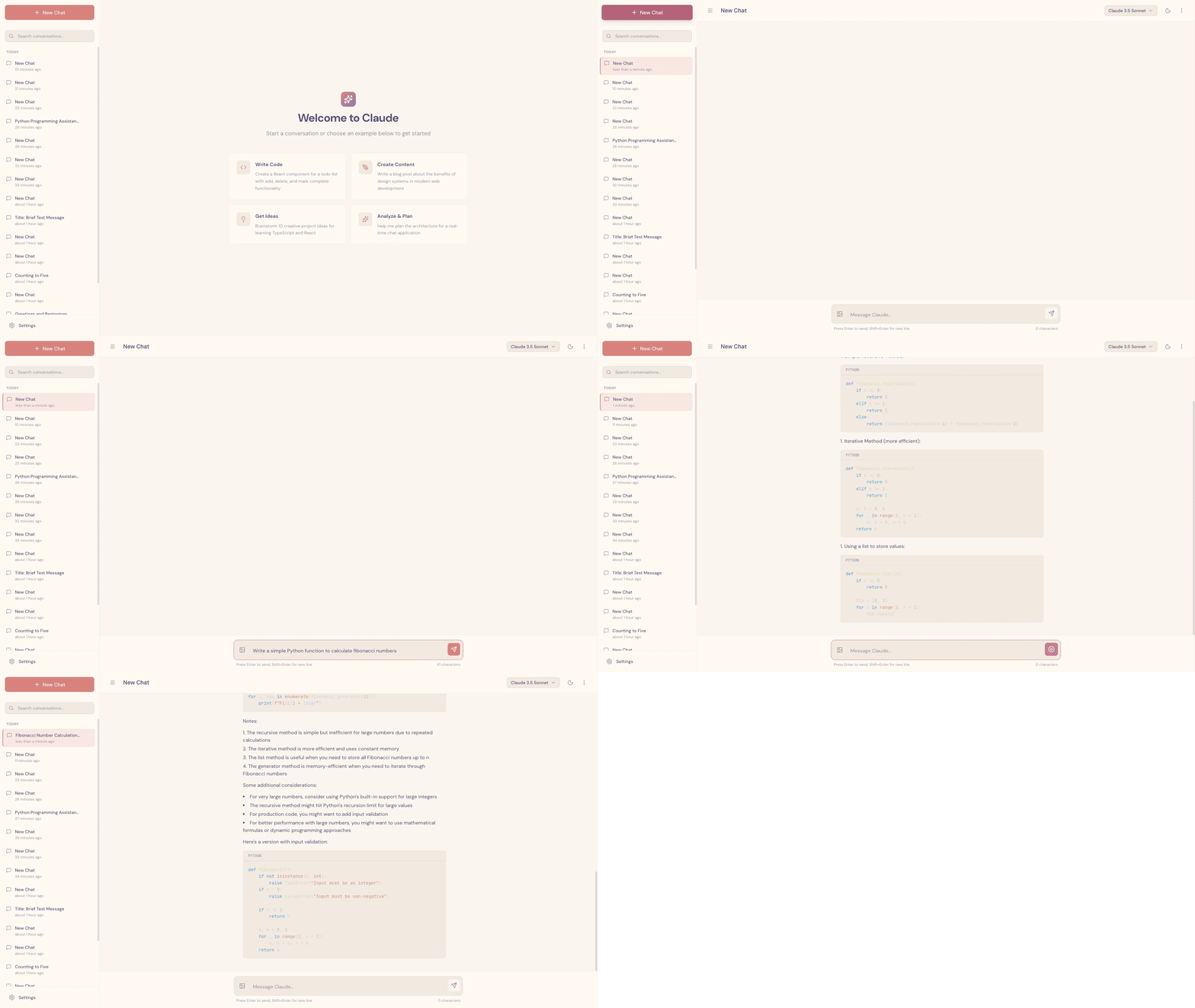
为 Claude 提供这类测试工具,显著改善了表现,因为 Agent 能够识别并修复仅从代码中看不出来的缺陷。
Providing Claude with these kinds of testing tools dramatically improved performance, as the agent was able to identify and fix bugs that weren’t obvious from the code alone.
仍有一些问题尚未解决,例如 Claude 的视觉能力和浏览器自动化工具存在局限,使它难以识别所有类型的缺陷。比如,Claude 无法通过 Puppeteer MCP 看到浏览器原生的 alert 弹窗,因此依赖这些弹窗的功能往往存在更多缺陷。
Some issues remain, like limitations to Claude’s vision and to browser automation tools making it difficult to identify every kind of bug. For example, Claude can’t see browser-native alert modals through the Puppeteer MCP, and features relying on these modals tended to be buggier as a result.
迅速了解当前进展
Getting up to speed
完成上述设置后,我们会提示每个编程 Agent 执行一系列步骤,摸清当前状况。其中一些很基础,但依然有帮助:
With all of the above in place, every coding agent is prompted to run through a series of steps to get its bearings, some quite basic but still helpful:
- 运行
pwd,查看当前工作的目录。你只能编辑这个目录中的文件。 - 阅读 git 日志和进度文件,迅速了解最近完成了哪些工作。
- 阅读功能清单文件,选择优先级最高且尚未完成的功能来实现。
- Run
pwdto see the directory you’re working in. You’ll only be able to edit files in this directory. - Read the git logs and progress files to get up to speed on what was recently worked on.
- Read the features list file and choose the highest-priority feature that’s not yet done to work on.
这种方法可以让 Claude 在每次会话中节省一些 token,因为它不必再自行摸索如何测试代码。另外,让初始化 Agent 编写一个可以启动开发服务器的 init.sh 脚本,并在实现新功能之前先执行一项基本的端到端测试,也很有帮助。
This approach saves Claude some tokens in every session since it doesn’t have to figure out how to test the code. It also helps to ask the initializer agent to write an init.sh script that can run the development server, and then run through a basic end-to-end test before implementing a new feature.
在 claude.ai 仿制应用中,这意味着 Agent 每次都先启动本地开发服务器,再使用 Puppeteer MCP 新建聊天、发送消息并接收回复。这确保 Claude 能迅速发现应用是否处于损坏状态,并立即修复已有缺陷。如果 Agent 一上来就实现新功能,很可能会使问题恶化。
In the case of the claude.ai clone, this meant that the agent always started the local development server and used the Puppeteer MCP to start a new chat, send a message, and receive a response. This ensured that Claude could quickly identify if the app had been left in a broken state, and immediately fix any existing bugs. If the agent had instead started implementing a new feature, it would likely make the problem worse.
综合以上做法,一次典型会话会从下面这些助手消息开始:
Given all this, a typical session starts off with the following assistant messages:
Agent 的失败模式与解决方案
Agent failure modes and solutions
长时间运行的 AI Agent 中四种常见失败模式与对应解决方案的汇总。
Summarizing four common failure modes and solutions in long-running AI agents.
未来工作
Future work
这项研究展示了长时间运行的 Agent 运行框架中一组可行的解决方案,使模型能够跨越多个上下文窗口逐步推进工作。不过,仍有一些问题尚待解决。
This research demonstrates one possible set of solutions in a long-running agent harness to enable the model to make incremental progress across many context windows. However, there remain open questions.
最值得关注的是,目前还不清楚:跨上下文工作时,单个通用编程 Agent 的表现是否最佳,还是多 Agent 架构能够取得更好表现。让测试 Agent、质量保证 Agent、代码清理 Agent 等专门的 Agent 处理软件开发生命周期中的相应子任务,似乎有理由取得更好的效果。
Most notably, it’s still unclear whether a single, general-purpose coding agent performs best across contexts, or if better performance can be achieved through a multi-agent architecture. It seems reasonable that specialized agents like a testing agent, a quality assurance agent, or a code cleanup agent, could do an even better job at sub-tasks across the software development lifecycle.
此外,这个演示针对全栈 Web 应用开发进行了优化。未来的一个方向,是将这些发现推广到其他领域。这些经验中的部分或全部,很可能也适用于科学研究、金融建模等领域所需的长时间运行的 Agent 任务。
Additionally, this demo is optimized for full-stack web app development. A future direction is to generalize these findings to other fields. It’s likely that some or all of these lessons can be applied to the types of long-running agentic tasks required in, for example, scientific research or financial modeling.
致谢
Acknowledgements
本文由 Justin Young 撰写。特别感谢 David Hershey、Prithvi Rajasakeran、Jeremy Hadfield、Naia Bouscal、Michael Tingley、Jesse Mu、Jake Eaton、Marius Buleandara、Maggie Vo、Pedram Navid、Nadine Yasser 和 Alex Notov 的贡献。
Written by Justin Young. Special thanks to David Hershey, Prithvi Rajasakeran, Jeremy Hadfield, Naia Bouscal, Michael Tingley, Jesse Mu, Jake Eaton, Marius Buleandara, Maggie Vo, Pedram Navid, Nadine Yasser, and Alex Notov for their contributions.
这项工作凝聚了 Anthropic 多个团队的共同努力,是他们让 Claude 能够安全地开展长程自主软件工程,尤其要感谢代码强化学习与 Claude Code 团队。有意参与这项工作的候选人,欢迎通过 anthropic.com/careers 申请。
This work reflects the collective efforts of several teams across Anthropic who made it possible for Claude to safely do long-horizon autonomous software engineering, especially the code RL & Claude Code teams. Interested candidates who would like to contribute are welcome to apply at anthropic.com/careers.
脚注
Footnotes
1. 在这里,我们将它们称为不同的 Agent,仅仅是因为它们的初始用户提示词不同。除此之外,系统提示词、工具集和整体 Agent 运行框架都完全相同。
1. We refer to these as separate agents in this context only because they have different initial user prompts. The system prompt, set of tools, and overall agent harness was otherwise identical.
— 全文完 —
原文来自 Anthropic,中文为非官方学习译文。
查看原始出处 ↗